Loading…
What a Captive Portal Actually Is, and What It Costs
By weirdtoo·August 22, 2026·12 min read
Clear breakdown of captive portals—what they do, hardware and privacy needs, costs, and when to pay for guest WiFi.
What a Captive Portal Actually Is, and What It Costs
If your guest WiFi just hands out a password, it is doing almost nothing for you. In most single-location bars, cafes, and event spots, the choice is simple: use a basic router splash page for terms, or pay $10–$150 per month for a guest WiFi platform if you will actually use email signups, promos, and login data.
Here’s the short version:
- A captive portal is the login gate before guests get internet access.
- The screen guests see is the splash page. The part that sets time limits, bandwidth rules, and access is the portal system.
- Basic setups can cost $0 per month if your router already supports it.
- Paid platforms often cost $10–$150 per site per month or $30–$150 per access point per month.
- Hardware for small venues usually lands around $100–$500 if you need new access points.
- Guest sessions often run 4–8 hours, and average visit time is about 42 minutes.
- Portals can get 25%–40% more guest data than plain open WiFi, but only if the login flow is short and not annoying.
- If you collect emails, you need a privacy notice, separate marketing consent, and records showing who said yes.
The awkward part: a nicer login page does not fix bad WiFi, bad offers, or staff who will never use the data. If your only goal is “click to accept terms,” stop at the cheap setup. If you want promos and email follow-up, pay for the platform and use it. If you are thinking about a custom build for one bar, that is how you buy yourself an expensive little headache.
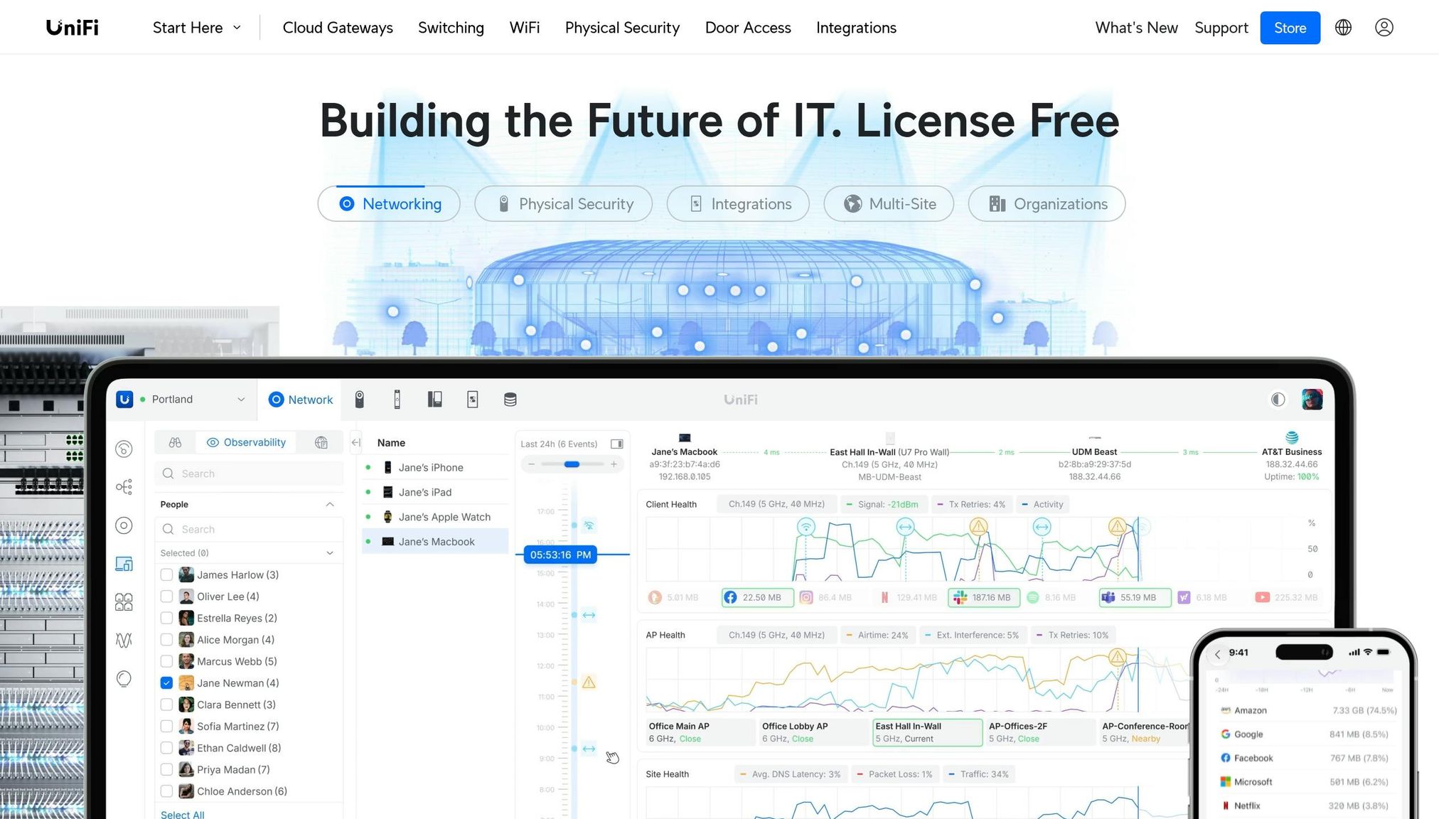
Unifi Guest Portal Setup And Configure: Learn how to set up WiFi Access for your guests.
sbb-itb-342b8b2
Quick Comparison
| Option | Monthly Cost | Setup Cost | Best For | Main Limit |
|---|---|---|---|---|
| Password-only WiFi | $0 | $0 | Fast access | No data, no rules |
| Router splash page | $0 | $0–$100 | Terms, logo, basic welcome screen | Weak on email and reporting |
| Guest WiFi platform | $10–$150/site or $30–$150/AP | $200–$600 | Email signup, promos, login data | Costs add up fast with more APs |
| Custom build | High | $1,000–$10,000+ | Very specific setups | Too much for most single locations |
If you run a room where every dollar and every staff minute matters, this is not about fancy tech. It is about whether the WiFi gate does one job well, or just sits there looking busy.
What a captive portal is on your guest WiFi
A captive portal is the gate in front of your internet. The guest joins WiFi, but they do not get normal access yet. First they hit a welcome page and have to do something before they’re let through, like enter an email address or accept your terms.
That welcome page is the part they see. The portal is the part doing the work in the background. For you, that’s the bit that matters. Not the pretty page. The rules behind it.
The basic flow from WiFi join to internet access
The flow is simple.
A guest joins your network. They get sent to the splash page. They complete the prompt. Then they get internet access.
After that, the portal keeps track of the guest session in the background. It can set a time limit on that session, often around 4–8 hours [2][4]. That stops a phone that wandered off at lunch from still hanging onto a spot on your network at dinner. It can also cap bandwidth per device, which helps stop one person from eating the whole connection because they decided now was the right time to stream half the internet.
Splash page vs. captive portal system
The splash page is what guests see. The captive portal system is what enforces access behind it.
| Component | What it is | What it does |
|---|---|---|
| Splash page | The screen guests see | Branding, data collection, consent |
| Captive portal system | The backend mechanism | Access control, session rules |
A basic router splash page can look almost the same at first glance. That’s the trap. It may look fine and still do very little once you peek under the hood.
The backend control is the whole point. That’s what makes the next question worth asking: what can the portal actually do for your guests and for the place you run?
What a captive portal can actually do for your venue
Collect email opt-ins and show promotions before guests go online
That first screen is the only clean shot you get. The guest wants Wi-Fi. They are already looking at the phone. They are waiting anyway. So use it.
A decent portal can show a drink special, tonight’s event, a loyalty perk, or an email opt-in before access is granted. And yes, this part can work. Businesses using captive portals see 25% to 40% higher data capture rates than open networks [1][3]. That does not mean every guest will hand over an email with a smile. Plenty will skip it if you make it annoying. But if the offer is clear and the screen is simple, you get more names than you would from a password scribbled on a chalkboard.
Each email gives you one more shot to fill a dead Tuesday. Not magic. Just a way to say, hey, trivia starts at 7:00 PM and the first round is on us. The same setup can also decide who gets on your network and what they can do once they are there.
Set rules that protect your network and manage guest use
This is the part people ignore until something dumb happens.
The biggest non-marketing use is protection. You can keep guest Wi-Fi away from your POS and office gear, cap bandwidth per device, set session limits, and require terms acceptance [2][6]. That means one guy streaming a game in the corner does not eat the whole pipe, and your card terminal is not hanging out on the same network as 40 strangers.
None of this is glamorous. It is just basic housekeeping for the internet connection you already pay for.
What the analytics can tell you and what they cannot
The useful numbers are pretty plain:
- total logins
- new vs. returning guests
- visit frequency
- dwell time
Guest sessions last about 42 minutes on average [3]. That gives you a decent timing baseline for email sends or loyalty nudges. If people usually sit for 42 minutes, a promo sent three hours later is a different bet than one sent the next morning.
Here is the uncomfortable part: analytics do not explain your problems. They can tell you Thursdays fell off. They cannot tell you whether the bartender was slammed, the patio smelled weird, or your burger got worse. Data is a prompt, not a diagnosis.
Also, device-level tracking is less steady on newer phones [7]. So if the numbers look a little slippery, that is not always operator error. Sometimes the phone just does not want to be watched, which, fair enough. The next section breaks down what it takes to run one without overbuilding it.
What you need to run one without overbuilding it
Basic network and hardware requirements for a small U.S. venue
Before you price a thing, fix the network.
A lot of people do this backward. They shop for software first, then find out the router can’t handle guest login, can’t split guest traffic from staff traffic, or both. That’s how you end up with a nice-looking setup sitting on top of bad plumbing.
For a small U.S. venue, the first check is simple: can your gear handle guest login and separate access? Business-grade gear often has captive portal tools built in. Consumer gear often doesn’t. That’s the annoying part nobody tells you until after you buy the cheap box.
For many small venues, prosumer access points usually land around $100–$500 in hardware costs, while low-end setups can be as little as $0–$100 if the router already supports the feature [6]. If you already own the router, lucky you. If not, don’t assume the product page means anything useful. Check the router software is current, and make sure the access point explicitly says it supports captive portal features [8].
Two things matter more than the shiny extras [6]:
- Keep guest devices from talking to each other
- Keep guest Wi-Fi separate from staff and POS gear
That split is not optional. Your card terminal does not need to share space with someone doomscrolling Instagram at table six.
Also, don’t lean on one shared guest password if you want tracking, marketing opt-ins, or any kind of usage control. A shared password gets people online. That’s it. It does not give you clean records, and it won’t help much if you want to know who agreed to what.
Privacy and consent basics for U.S. guest data collection
If your portal collects guest data, a few parts are not up for debate.
Show a short privacy notice on the login screen. Ask for marketing consent separately instead of stuffing it inside Wi-Fi access. Keep opt-in records so you can prove consent was given. And do not make people sign up for marketing just to get online.
That’s the floor, not the fancy version.
If you skip any of that, you’re not being scrappy. You’re just making a small mess now so future-you can clean up a bigger one later.
Once those basics are in place, the next call is pretty plain: is a basic router splash page enough, or do you need a paid platform?
What a captive portal costs and which option fits your venue
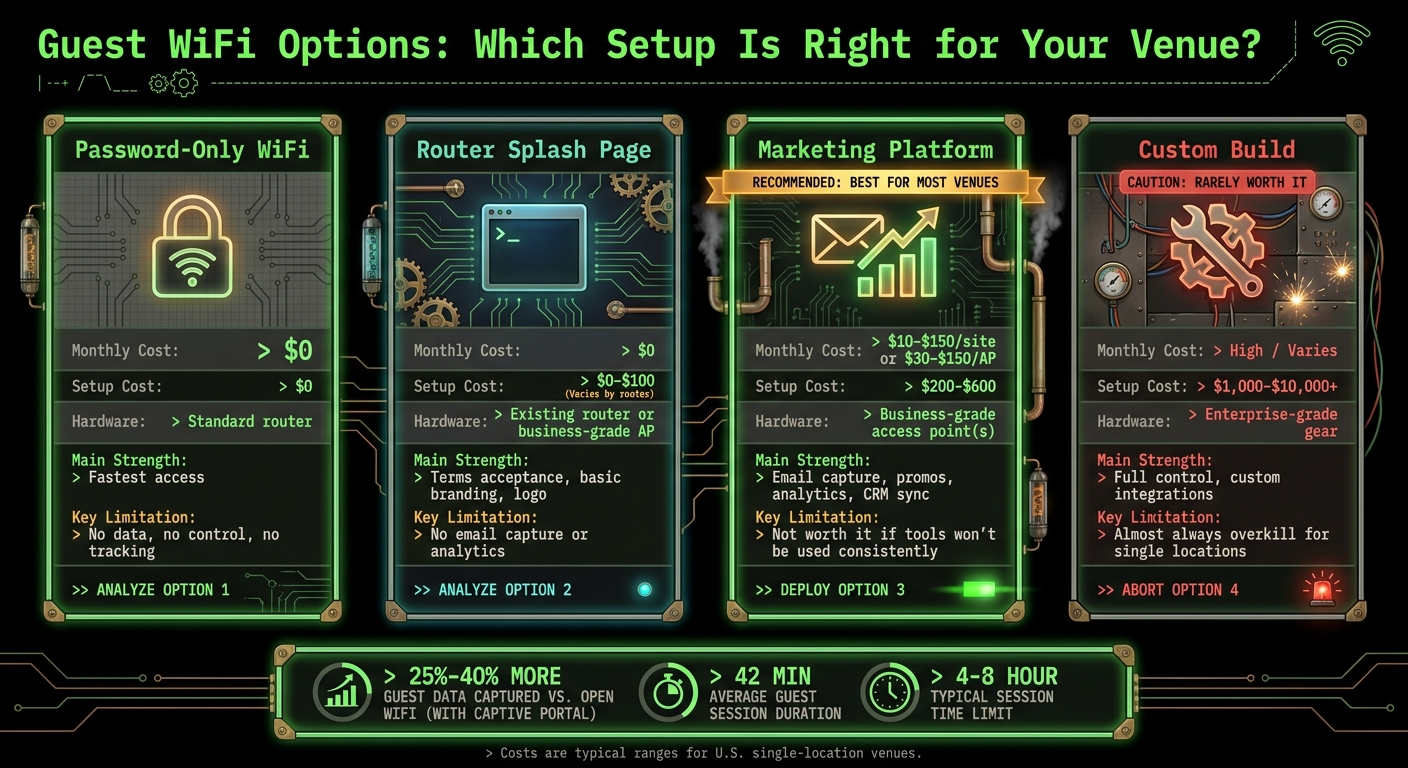
Guest WiFi Captive Portal Options: Cost & Feature Comparison
Once your network and consent setup are sorted, this comes down to three paths: free, paid software, or a custom build.
Not all three make sense.
The low-cost end: password-only WiFi and basic router splash pages
The cheapest setup is also the most bare-bones. You either give people the password, or you use the splash page already built into your router. Both can cost $0 per month on top of the internet plan and hardware you already have [6][4].
Password-only WiFi is dead simple. No extra bill. No extra setup. Also no tracking, no data, and no control beyond changing the password when someone posts it on Instagram.
A basic router splash page gives you a little more. You can add your name, your logo, and a terms box. That is fine if all you need is terms acceptance.
It falls apart the second you want email capture, promos, or analytics. Most basic router splash pages just do not do that well, if at all.
If terms acceptance is the whole job, stop there. If not, go up a tier.
Typical software and setup costs for guest WiFi platforms
Paid guest WiFi platforms usually charge by site or by access point. Cloud-hosted tools often sit around $10 to $150 per site per month [5]. More sales-focused platforms can cost $30 to $150 per access point per month [2].
That per-AP pricing is where people get caught. One access point sounds cheap. Three or four across a bar, patio, and back room is a different story.
There is usually setup cost too. Not always huge, but not nothing.
When basic is enough, when a marketing platform makes sense, and when custom is a waste
Pick based on what you will use, not what looks fancy in a demo.
Use a router splash page if you just need terms acceptance. Use a marketing platform if you want email capture and promos. A custom-built portal is almost always too much for a single bar, cafe, or venue. The build cost hurts, then the upkeep keeps hurting. Any upside disappears fast [2][5].
Here is the blunt version:
| Option | Typical Monthly Cost | Setup Cost | Hardware Needs | Main Strength | Not Worth It If... |
|---|---|---|---|---|---|
| Password-only WiFi | $0 | $0 | Standard router | Fastest access | You want any data or control |
| Router splash page | $0 | $0–$100 | Existing router or business-grade AP | Terms acceptance, basic branding | You want email capture or analytics |
| Marketing platform | $10–$150/site/mo or $30–$150/AP/mo | $200–$600 | Business-grade AP(s) | Email capture, analytics, CRM sync | You won't use the tools consistently |
| Custom build | Varies (high) | $1,000–$10,000+ | Enterprise-grade gear | Full control | Single location; almost always overkill |
For most single-location venues, the plain answer is this: use the router splash page if marketing is not the goal, or use a marketing platform if it is [2][6]. Anything past that is usually buying yourself a side job you did not ask for.
Conclusion: What is worth paying for and what is not
After the feature and pricing breakdown, this comes down to one blunt question: does the captive portal do more than a plain splash page?
If it helps you collect emails, run promos, or control guest access better than the basic version, paying for it can make sense. If not, you are just buying a nicer screen before the WiFi works. That is not a plan. That is decor.
For most small venues, the sane choice is simple:
- a basic splash page, or
- a paid platform with one clear marketing use
Most single-location bars, cafes, and venues do not need a custom build. That road gets expensive fast, and half the time it solves a problem nobody has on a Tuesday night.
Pay for business-grade hardware with client isolation, consent logging, and privacy notices. Skip enterprise subscriptions and custom builds unless you need one specific integration and can say exactly why.
FAQs
Do I need a captive portal or just a splash page?
You need both. They do two different jobs, and they only make sense together.
The captive portal does the back-end work. It stops guest traffic, starts and ends sessions, and applies the rules for who gets online and for how long.
The splash page is the front part people see. That is the branded screen where a guest taps to accept terms, enters contact info, or lands on whatever you want to show first.
Take away the captive portal, and the splash page is just a page floating out there for no reason. Nobody is going to visit it on purpose while trying to get on your WiFi.
Will a captive portal slow down guest WiFi?
Not by itself.
A captive portal just adds a short waiting room before the internet kicks in. The guest joins your WiFi, sees a login or terms page, taps once or twice, and moves on.
When WiFi feels slow, the portal is usually not the main problem. The problem is the junk piled onto it: a slow-loading page, oversized images, too much script, or a splash screen trying too hard. That is when people think the WiFi is broken, give up, and switch to cellular.
A decent setup keeps the delay short. In most cases, you are looking at 1 to 10 seconds, depending on how the login works.
What setup is enough for one small venue?
For one small venue, this is usually a one-access-point job, not a full network rebuild.
You’ll need a business-grade access point or a router that supports a captive portal. Then set up a separate guest network the right way:
- one guest SSID
- an isolated guest VLAN
- client isolation turned on
- no access to internal subnets
- internet-only access
That split matters. If you dump guests onto the same network as your POS, back-office gear, or staff devices, you’re asking for trouble. Cheap setups do this all the time. It works until it doesn’t.
Then turn on the captive portal for that guest SSID. Keep it simple: click-to-agree or email capture, plus clear terms and privacy language. No giant form. No weird friction. People came for a drink, a show, or a haircut, not a small homework assignment.
If your access point already has portal settings built in, use them. For a single-AP site, plan on about 1–2 hours.
Current contact path
Need Weird Network WiFi, custom apparel, or scoped help?
Use the contact form; removed product, checkout, research, and newsletter funnels stay offline.