Loading…

How Venues Use WiFi Data Without Being Creepy
By weirdtoo·October 5, 2026·6 min read
Use WiFi counts and signal metrics safely: collect only aggregate data for staffing or coverage, limit retention, and disclose policies.
How Venues Use WiFi Data Without Being Creepy
I’d start with one hourly device-count report - not a file on your guests. If your bar logs 180 connected devices from 7:00 to 8:00 p.m., check queues and sales before adding staff. That is not 180 people.
Here’s the setup I’d use:
- Collect less: Keep totals for staffing, or signal and congestion data for coverage. Skip browsing history and guest profiles.
- Check the network: A separate WiFi name is not a locked door. Test that guests cannot reach payment or staff systems.
- Keep reports grouped: Use broad time windows and a minimum group size. Dwell time and return rates are estimates, not facts about people. Device-linked tokens are not anonymous.
- Explain the deal: Tell guests what you collect before it starts. Separate analytics choices from internet access, and check state-specific rules.
- Check the back room: Restrict access, set deletion deadlines, and verify vendor copies are deleted too. A tidy dashboard proves nothing.
My rule: <u>keep a metric only if it changes a staffing or coverage decision.</u> Otherwise, it is another thing to maintain - and another privacy risk.
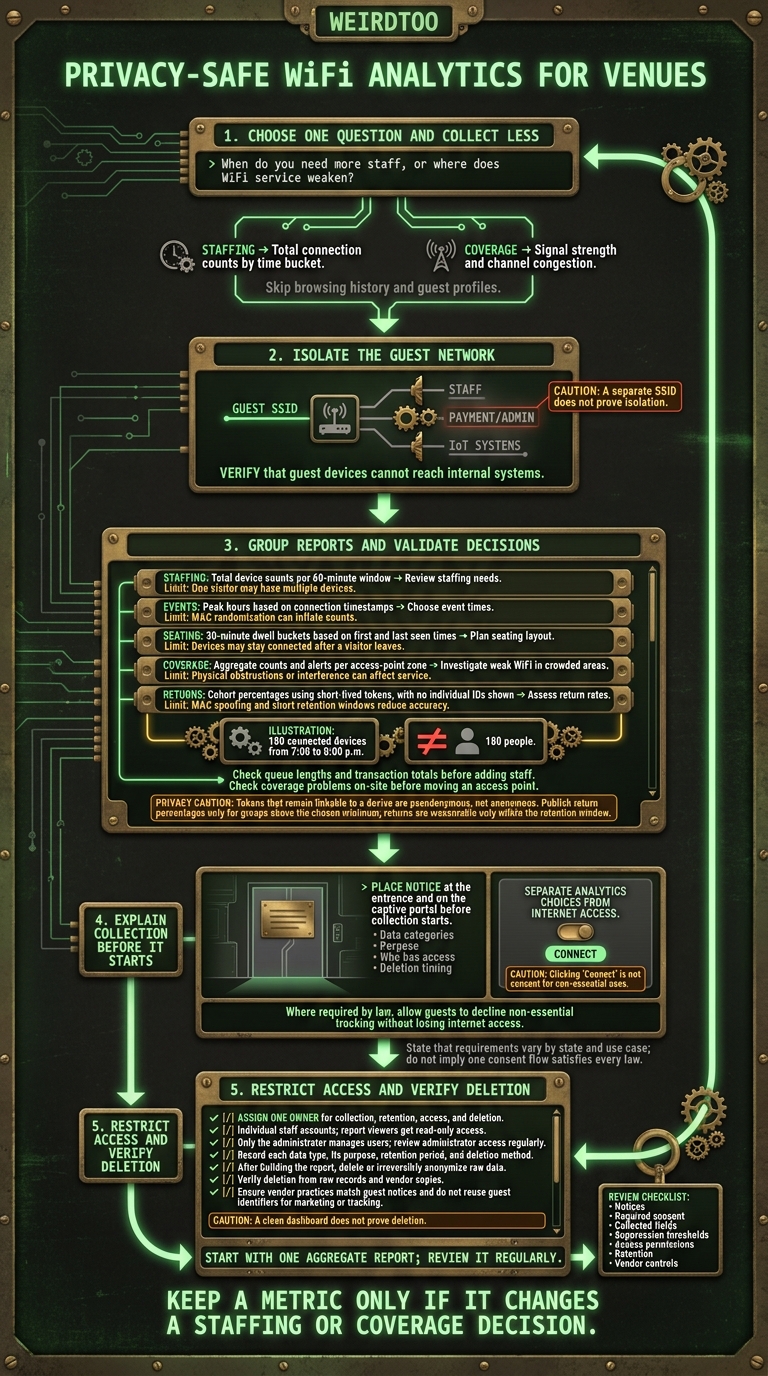
Privacy-Safe WiFi Analytics for Venues
Step 1: Collect Only the WiFi Data You Need
Pick one question: when do you need more staff, or where does WiFi service weaken? For staffing, keep total connection counts by time bucket. For coverage, use signal strength and channel congestion.[1] Collect only what answers your chosen question. That keeps the data clean for the reports you’ll use next.
Keep Guest WiFi Separate From Business Systems
Give guests a dedicated SSID, then use VLANs or equivalent controls to separate their traffic from staff, payment, administrative, and IoT systems.
A separate SSID does not prove isolation. A different network name is not a locked door. Ask your installer to verify that guest devices cannot reach any of those systems.[3]
Then check how much identifying detail your dashboard shows.
Compare WiFi Setups and Check Their Features
Check the exact router, subscription, and configuration. The product category alone tells you too little.
- Guest isolation: Verify that guest devices cannot access internal systems.[3]
- Aggregate reporting only: Use only the minimum data needed for aggregate reports.[3]
- Permission controls: Give report viewers Read and Analyze access only.[4]
Limit Identifiers and Dashboard Detail
Set analytics to Statistics mode and keep only anonymous reporting.[3] Use device-type and vendor labels instead of full MAC addresses.[1] Limit dashboard access to Read and Analyze.[4] You need reports that answer your question, not profiles of the people using your WiFi.
sbb-itb-342b8b2
Step 2: Turn Aggregate Reports Into Venue Decisions
Use the totals to check staffing, seating, event timing, and return rates. Keep time windows coarse, set a minimum group size, and publish aggregate reports only.
| Decision | Report | Known limit |
|---|---|---|
| Review staffing needs | Total device counts per 60-minute window | One visitor may have multiple devices [1][2] |
| Choose event times | Peak hours based on connection timestamps | MAC randomization can inflate counts [2] |
| Plan seating layout | 30-minute dwell buckets based on first and last seen times | Devices may stay connected after a visitor leaves |
| Investigate weak WiFi in crowded areas | Aggregate counts and alerts per access-point zone | Physical obstructions or interference can affect service [1] |
| Assess return rates | Cohort percentages using short-lived tokens, with no individual IDs shown | MAC spoofing and short retention windows reduce accuracy [2] |
Plan Staffing and Events Around Busy Hours
If about 180 devices connect from 7:00 to 8:00 p.m., review queue lengths and transaction totals before adding a shift.
A device count is not a head count. Check it against what happened at the counter before changing staffing or event times. The same reports can help locate service problems inside your venue.
Find Coverage Gaps and Crowded Areas
Use counts and alerts by access-point zone to spot crowded areas. Check the problem on-site before moving an access point. A crowded zone and poor service may overlap, but obstructions or interference can also affect the connection [1].
For seating changes, compare 30-minute dwell buckets with observed seating demand. A connected device does not prove someone is still sitting there.
Estimate Return Visits Without Building Profiles
Keep repeat-use reports at the cohort level. Use short-lived anonymous tokens, but be precise: tokens that remain linkable to a device are pseudonymous, not anonymous.
Publish only return percentages for groups above your minimum count. Randomized identifiers can make returning devices look new, while shared devices blur the estimate [2]. Short retention also limits what you can measure: the report shows only returns within that window.
Step 3: Explain Collection and Enforce Privacy Rules
Tell Visitors What You Collect Before They Connect
Once you choose aggregate reports, tell guests what you collect. Put a short notice at the entrance and on the captive portal before collection starts. Link to a full notice covering data categories, why you collect them, who has access, and when you delete them.
Keep analytics separate from internet access data [3]. Clicking “Connect” is not consent for non-essential uses. Provide a clear “Manage options” or “View preferences” control. Where the law requires it, guests must be able to decline non-essential tracking without losing internet access [3].
Set Data Retention, Access, and Deletion Rules
Give one person responsibility for collection, retention, access, and deletion [3]. Keep a simple record of each data type, its purpose, how long you keep it, and how you delete it. Once the report is built, delete or irreversibly anonymize the raw data.
Give staff individual accounts with read-only access. Only the administrator should manage users [4]. Review administrator access regularly. Remove access when an employee or contractor no longer needs it.
A clean dashboard does not prove deletion. Test whether data is gone from raw records and vendor copies, too. Verify that the vendor can follow the same limits.
Check Legal Requirements and Vendor Practices
Before switching on analytics, check that the vendor supports aggregate-only reporting, short retention periods, and deletion you can verify. Its access, sharing, storage, and deletion settings must match the notice guests see. Confirm that guest identifiers are not reused for marketing or tracking.
U.S. requirements vary by state and use case. One consent flow will not necessarily cover every obligation. Seek qualified legal counsel before using identifiers for profiling, marketing, or data sharing.
Conclusion: Start With 1 Report and Review It Regularly
Start with one aggregate report that answers a staffing or coverage question. Check whether the peak periods it shows match the demand you see.
If the report earns its keep, use each scheduled review to check notices, required consent, collected fields, suppression thresholds, access permissions, retention, and vendor controls too.
Keep a metric only if it changes a staffing or coverage decision. Drop it if it adds privacy risk or upkeep without changing how you staff or cover a shift.
FAQs
How can I check whether WiFi counts reflect actual foot traffic?
Compare your WiFi counts with manual head counts or door-counter totals over the same time intervals. WiFi counts devices with WiFi turned on, not people. Staff phones, passersby, and one customer carrying several devices can all show up in the count.
Run spot checks periodically or compare the counts with your point-of-sale transaction volume. That helps you build a baseline for how many detected signals tend to match customers entering your venue.
What minimum group size protects guest privacy?
The provided search results do not state a minimum group size for protecting guest privacy when using WiFi data.
How can I verify my WiFi vendor deletes guest data?
Check the vendor’s service agreement and privacy policy for specific retention timelines. If neither says how long they keep your data, the limit is unknown.
Request a data processing addendum or written confirmation that they follow your retention limits. Ask for documentation showing how automated deletion works. “We delete it” is not a process description.
If the dashboard offers data expiration settings, check whether you can set those limits and audit them. Verification still depends on what the vendor commits to in writing and how openly they explain their data handling.
Current contact path
Need Weird Network WiFi, custom apparel, or scoped help?
Use the contact form; removed product, checkout, research, and newsletter funnels stay offline.