Loading…
How to Turn Guest WiFi Into Repeat Customers
By weirdtoo·September 7, 2026·12 min read
Guest WiFi should earn opt-ins, surface one clear offer, and send three short follow-ups to turn first visits into repeat customers.
How to Turn Guest WiFi Into Repeat Customers
Your guest WiFi should do three jobs: keep card payments off the guest network, collect one contact detail with clear consent, and send one short follow-up that gets people back in. If all you do is post a password, you give away internet and get $0 back from that moment.
Here’s the short version for a bar owner staring at a half-full room on Tuesday, September 7, 2026:
- Split the network. Guest phones should never sit on the same network as your POS or office devices.
- Use a branded login page. Lead with one offer, not a buffet of bad ideas.
- Ask for less. Usually name + email is enough. More fields = more drop-off.
- Use the next screen. Don’t waste it on “You’re connected.” Push the menu, event, or return offer.
- Send 3 messages max. Welcome, return offer, win-back. Then stop unless you have a better reason to write.
- Track 3 numbers. Opt-ins, return visits at 7 / 14 / 30 days, and offer redemptions.
The awkward part: most guest WiFi setups fail because they ask too much, say too little, or send dull follow-ups nobody wants. The fix is not fancy. It is a short form, a plain offer, and a login flow that does not feel like filing taxes.
How to Automate WiFi Marketing with WAVER OS – Email, SMS, Coupons & More
sbb-itb-342b8b2
Quick comparison
| Setup | What you get | What you miss | Best use |
|---|---|---|---|
| Password-only | Fast access | No contact list, no follow-up, no tracking | Internet only |
| Basic captive portal | A login screen and light branding | Little or no contact data, weak follow-up | Simple access with a promo screen |
| Marketing platform | Email/SMS opt-ins, follow-up, offer tracking | More setup time and more moving parts | Repeat-visit play |
If you want guest WiFi to bring people back, the job is simple: make sign-in short, make the offer plain, and make the follow-up worth opening.
1. Set up guest WiFi to support marketing, not just access
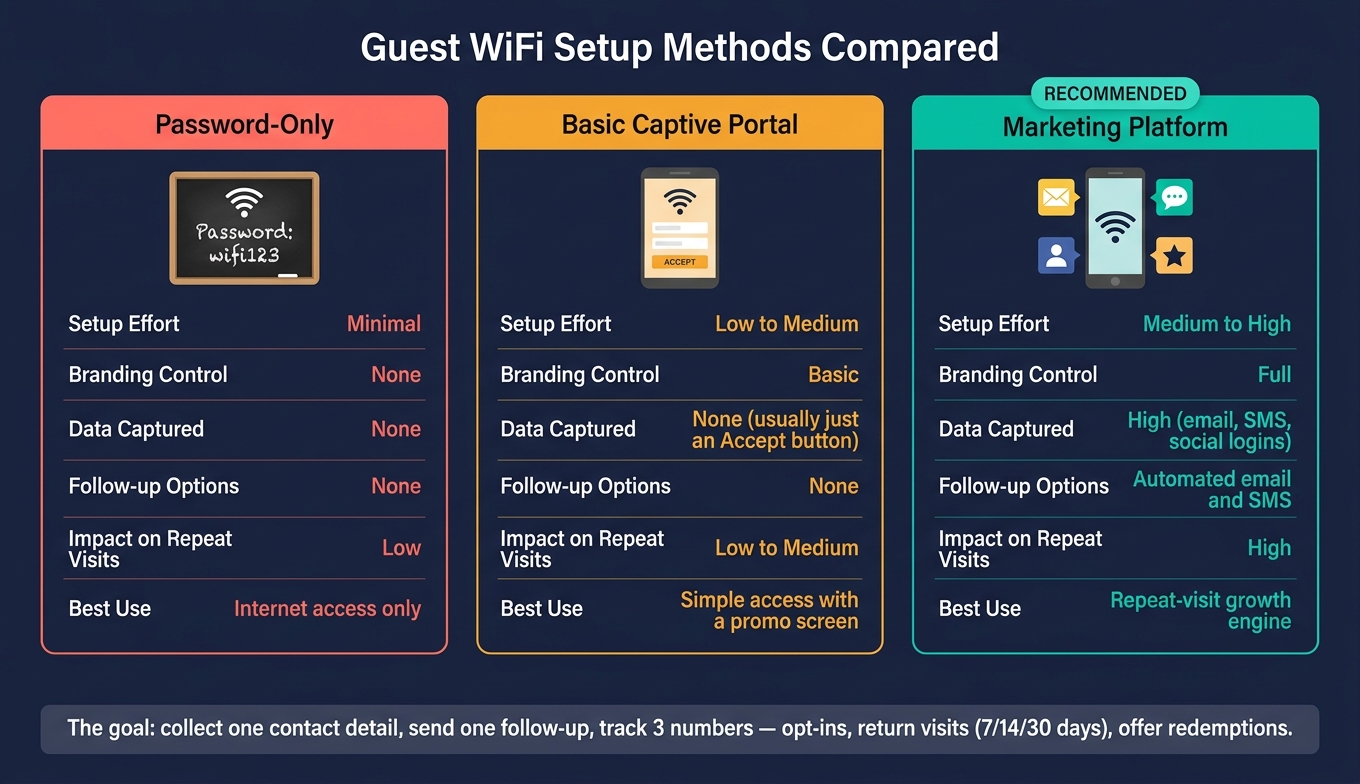
Guest WiFi Setup Methods Compared: Password-Only vs Captive Portal vs Marketing Platform
Guest WiFi does not become marketing by accident. It only helps if it is separate, branded, and set up to collect contact details you can use later.
Start with the network. If guest traffic is mixed in with the rest of your setup, the pretty login page is just decoration.
Keep guest WiFi separate from staff and payment systems
Keep guest devices off staff and payment systems [4]. Your point-of-sale system, back-office computer, and payment terminal should never share a network with customers [4]. That is not paranoia. That is basic cleanup.
Put a cap on guest bandwidth too, so one table streaming video does not slow down card payments. Nothing says "we have our act together" like a frozen payment screen.
Compare password-only WiFi, basic captive portals, and marketing platforms
Writing the password on a chalkboard gives away internet and gets you nothing back. Here is where the gap shows up:
| Method | Setup Effort | Branding Control | Data Captured | Follow-up Options | Impact on Repeat Visits |
|---|---|---|---|---|---|
| Password-only | Minimal | None | None | None | Low |
| Basic captive portal | Low to Medium | Basic | None (usually just an "Accept" button) | None | Low to Medium |
| Marketing platform | Medium to High | Full | High (email, SMS, social logins) | Automated email/SMS | High |
Shared passwords spread fast; individual logins or tokens keep access tied to real guests [3].
Pick the right login method for building a list you own
Most setups give you four login options: click-through, email capture, SMS capture, and social login.
Here is the blunt version:
- Click-through is easiest for the guest and worst for you. No contact detail, no follow-up, no list.
- Email capture is worth using because it gives you a direct way to reach people after they leave.
- SMS capture can work for the same reason, though people tend to guard their phone number more closely.
- Social login looks clever, but email and SMS are usually the ones to put first if the goal is a list you control.
Use short opt-in text next to the button so people know they are joining your list. Keep it plain. No one trusts a mystery checkbox.
Once the network can collect contacts, the next move is a login page that turns that traffic into an opt-in.
2. Build a login page that promotes tonight and earns the opt-in
The login page is not decoration. It is the first thing a guest sees after they join your Wi-Fi, and for about five seconds, you have their attention. Use it for tonight, not for vague future marketing plans.
Lead with one clear offer before the form
Put one plain offer at the top. One. Not three.
Good examples:
- Get tonight's specials
- Get 10% off your next visit
That works because it tells the guest what they get right now or soon after. No mystery. No fluff.
Ask only for the details you will actually use
Keep the form short. Collect only name and email [2]. Every extra field gives people one more reason to bail.
Then put a simple consent line right under the input field. Guests need a clear, plain-language opt-in before you collect their data [1][4]. Something like "We'll send you specials and updates. You can unsubscribe anytime." does the job.
This is not the place for a law-school paragraph. Plain English wins.
Use the post-login screen to promote menus, events, and loyalty
A lot of places get the opt-in and then waste the next screen on a dead-end "You're connected" message. Great. The phone works. Nobody needed a banner to explain that.
Use the post-login page to push the next action. Exclusive offers can drive repeat visits [2].
Pre-login gets the opt-in. Post-login gets the click, the order, or the comeback visit.
| Pre-Login Page | Post-Login Page | |
|---|---|---|
| Primary goal | Earn the opt-in | Drive immediate action |
| Menu promotion | Tease "tonight's specials" as the reason to sign up | Link directly to the full menu or mobile ordering |
| Event promotion | Mention one headline event, such as "Live Music Tonight" | Show a full calendar or RSVP link |
| Loyalty prompts | Offer a perk for joining, like "10% off your next visit" | Provide a sign-up form or QR code for the loyalty program |
| Return offers | Use as the headline hook | Display a unique, scannable coupon code |
Keep the post-login screen updated with today's menu, event, or offer. If it still says Taco Tuesday on Friday, the whole thing starts to smell fake.
Once the portal captures the opt-in, the next move is a short follow-up that gives guests a reason to come back.
3. Turn WiFi sign-ins into follow-up messages that bring people back
Getting the email or SMS opt-in is not the win. It just means you now have permission to say one more thing later.
The follow-up does the heavy lifting. Use the WiFi login to start the relationship. Then send a short set of automated messages that gives people a reason to come back. Not seven messages. Not a fake "journey." Three is enough to start.
Start with three messages: welcome, return offer, and win-back
Stick to three automated messages unless you have a clear reason to add more.
Message 1 - Welcome: Send a short welcome email right after they connect. Confirm they got online. Add one quick line that shows you are paying attention and trying to help, not just sell. The point is to make the first message feel useful, not needy.
Message 2 - Return offer: A few days later, send something specific that has actual value. A discount. A member-only update. Early access to an event or a menu item. Keep it plain. If someone has to decode the offer, you already lost them.
Message 3 - Win-back: If they still have not come back after a few weeks, send one last message with one clear reason to return. Then stop. Do not keep poking people because software makes it easy. Reach out again only when you have a better reason.
These three sends cover the full cycle from first visit to return visit.
Match the message to why people came in the first place
A coffee shop, bar, or venue should not send the same follow-up to first-timers, regulars, and event guests. Those are different people with different motives. Treating them the same is lazy, and people can feel it.
"When you know your target-audience segments... you're serving up the right piece of information with the right motivators to the right person to get the right answer." - Jaci Russo, CEO, BrandRusso [5]
Generic blasts usually get ignored. No mystery there. If someone came in for trivia night, send trivia-related follow-up. If they are a regular, skip the big introduction and give them a reason to show up again this week.
Keep loyalty simple and visible
Use one reward people can redeem in person without a speech, a code hunt, or staff confusion. Make it work at the register or bar. Mention it in the welcome message, remind them in the follow-up, and make the next step obvious.
| Trigger | Channel | Example Offer | Easiest Metric to Track |
|---|---|---|---|
| First WiFi login | Email or SMS | Welcome discount or first-visit perk | Total opt-ins |
| Repeat visit | Email or SMS | Member-only discount or early event access | Return rate |
| No return after a few weeks | One clear win-back offer | Win-back response rate |
Track the stuff that tells you if this is working: how many contacts you collect, how often people come back, and which offers or segments get a response [2][5].
If one message falls flat, do not pretend the system is broken in some mystical way. Change the timing, the audience, or the offer. Usually one of those is the problem.
Next, track which message and offer actually drive repeat visits.
4. Measure what drives repeat visits and fix what does not
Do not build a dashboard monster. You do not need one. You need a few numbers that tell you if people came back or vanished.
Look at before and after launch. Change one thing at a time. Not three. Not “we tweaked the page, the timing, and the offer.” That is how people end up guessing and calling it insight.
Track opt-ins, repeat visits, and offer redemptions
Start with opt-ins you can contact later. Count how many guests signed up and gave you permission to hear from you again. If that number is weak, the rest of the setup is already limping.
Then track return visits at 7, 14, and 30 days. Those time windows matter. A guest who comes back within 14 days is acting differently from someone who never returns, and that gap tells you if your follow-up is doing anything at all [2].
Last, count offer redemptions. How many people used the WiFi offer? Use one code per offer. Otherwise you are stuck with bar-stool math and vibes.
Test one variable at a time on the portal or follow-up
If opt-ins are low, do not panic and rebuild the whole login flow in one go. Change one part. Then compare results. Maybe it is the headline. Maybe it is the button copy. Maybe the offer is dull and people ignore it because they have seen a thousand versions of “join our list.”
One change at a time makes the cause easier to spot. That is the whole point.
Use a before-and-after scorecard to judge if the setup is working
Pick a before period and an after period. Then compare the same numbers on both sides. Same metrics. Same time frame. No funny business.
| Metric | Before Captive Portal | After Captive Portal | Why It Matters |
|---|---|---|---|
| Opt-ins | 0 | Total number of sign-ups and opt-ins | Ability to send direct follow-up messages [2] |
| Repeat visits | Unknown | Reconnection rate at 7, 14, and 30 days | Data-driven insight into customer loyalty [2] |
| Offer redemptions | N/A | Number of WiFi-specific codes used | Direct measurement of ROI on WiFi offers [2] |
Use the scorecard to see which offer, timing, or login change is actually moving repeat visits. Not what you hope is working. What the numbers say is working.
Conclusion: Keep the WiFi simple, the offer clear, and the follow-up useful
Here’s the whole playbook without the fluff: lock down the guest network, get a clear opt-in, send a follow-up, and track what comes back.
The part that does the work is the follow-up. Not the QR code. Not the splash page. Not the little “free WiFi” sign taped near the register like it’s 2014. A first visit turns into a second visit when you send one short thank-you email after that first stop.
That first connection should also do two jobs at once. It should lead people into your branded portal, and it should show them a plain offer they can use. Nothing fancy. No weird funnel nonsense. Just a clean handoff from getting online to having a reason to come back.
In a bar or café, that login moment is customer service. The guest is already standing there, already waiting, already looking at their phone. If you use that moment well, guest WiFi stops being free bandwidth and starts acting like a repeat-visit channel.
Once the basic setup works, then you tinker. Test the offer. Change the timing. Tighten the message. Small changes can lift repeat visits. Big complicated ones usually just make a mess.
FAQs
How do I set this up without technical skills?
You do not need to touch weird router settings to set up guest WiFi marketing.
Use a guest WiFi platform. It handles the ugly part for you.
Most of these tools give you a simple dashboard where you can set up the captive portal, collect email or SMS opt-ins, and queue up promo messages. So instead of messing with network admin screens that look like they were built in 2009, you can focus on the part that matters: getting customer info and following up later.
That means you can collect customer data and automate follow-up without needing networking skills.
Should I ask for email or phone number?
Yes. If you ask for an email address or phone number through a captive portal, guest WiFi stops being just free internet and starts doing a job.
That one screen can help you keep in touch with people after they leave. You can send event updates, loyalty offers, and follow-ups that bring them back in. Not every message will land. Most won't. But if you never collect contact details, you have no second shot at all.
The trade-off is simple: people hate friction. If your WiFi gate turns into a bad form, they'll bail or use cellular. So make the ask small, plain, and worth it. An exclusive deal works because the exchange makes sense. They get something now. You get a way to reach them later.
That is the whole move. Not magic. Just a fair trade on a screen they were already looking at.
How long before guest WiFi pays off?
There’s no fixed timeline here. ROI depends on what you do with the login, not the login itself.
If someone joins your WiFi and all they get is internet, that moment is gone. If the login nudges them toward an email or SMS opt-in, a loyalty perk, or your next event, now you’re starting something that can pay back later.
That’s the trade-off. You’re not buying one magic login and getting money out the other side. You’re using a small moment of attention to start a longer relationship. The return comes from steady follow-up over time, not from a single connection.
Current contact path
Need custom apparel or scoped help?
Use the contact form; removed product, checkout, research, and newsletter funnels stay offline.