Loading…

QoS Explained: Managing Bandwidth for ISPs
By weirdtoo·July 10, 2026·5 min read
Practical QoS guidance for small and rural ISPs: classify, mark, prioritize, shape, and monitor to keep VoIP and business traffic usable.
QoS Explained: Managing Bandwidth for ISPs
When a shared link fills up, QoS decides what still works. I’d sum it up like this: QoS helps an ISP sort traffic, set limits, and give first place to the traffic that matters most when bandwidth runs short.
If you run a small or rural ISP, the main jobs are simple:
- Classify traffic by app, port, subnet, or customer type
- Mark packets with DSCP so traffic gets the same treatment across the network
- Prioritize queues so voice, business apps, and other time-sensitive traffic go first
- Shape or police rates so one user cannot consume 100% of a busy link
- Apply rules at bottlenecks like edge routers and shared backhaul links
- Watch latency, jitter, drops, queue depth, and utilization during peak hours
In plain terms: if one backhaul link feeds many towers, towns, or business users, QoS helps stop one heavy stream from slowing everyone else down. That matters for things like VoIP, point-of-sale traffic, remote access, guest WiFi, and video calls.
A simple policy is often enough. I’d use a small number of traffic classes, per-subscriber or per-device caps, and clear priority rules. When utilization pushes toward 80% to 100% on a busy link, those settings can be the difference between a usable network and a congested one.
The short version: QoS controls order and rate. Order comes from classification, marking, and queuing. Rate comes from shaping and policing. Put both at the points where congestion shows up, then track the metrics that show if the link is under strain.
That’s the core of the article, without the extra noise.
WISPAPalooza 2025 - Thursday Keynote: QoE/QoS - Bandwidth Is A Lie!

Core QoS Tools and How They Manage Bandwidth
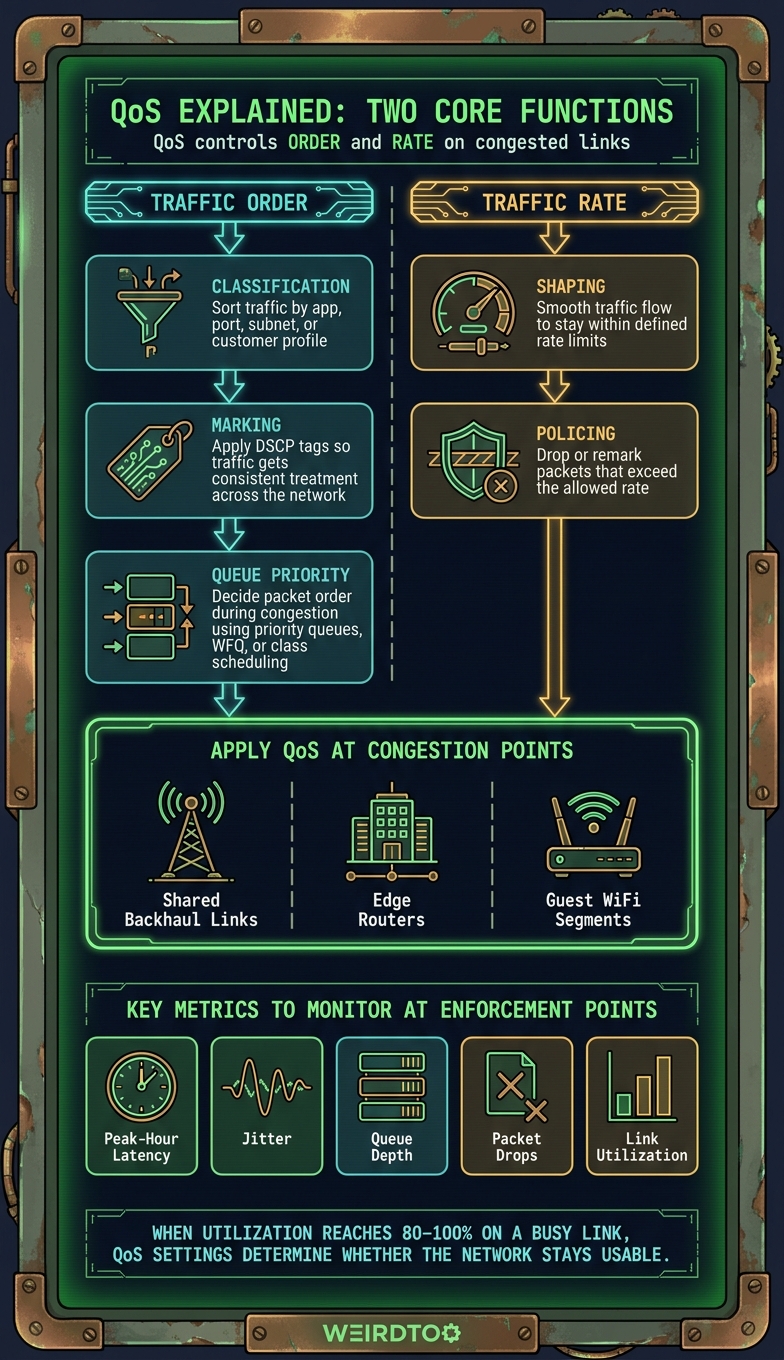
QoS Framework for ISPs: Classification, Priority & Rate Control
Classification, Marking, and Queue Priority
To make priority rules work on a live network, ISPs lean on three basic tools. For small and rural ISPs, that often means starting with simple traffic classes and clear rules about what comes first.
Classification sorts traffic into groups based on things like application, protocol, port, subnet, or customer profile. Marking adds DSCP or similar tags so that traffic gets the same treatment as it moves across the network. Queue priority decides packet order when a link gets congested. It uses priority queues, WFQ, or class scheduling to determine what moves first and how the available bandwidth gets divided during congestion.
Put simply, these tools decide traffic order. Shaping and policing decide traffic rate.
Where QoS Helps Most in Real ISP Operations
Shared Backhaul Across Towns, Towers, or Remote Sites
QoS matters most on shared links.
If one upstream connection feeds multiple access points - like tower sectors, relay sites, or even whole towns running through a single backhaul link - you’ve got the clearest case for QoS in a small or rural ISP setup.
Here’s the problem in plain English: during busy periods, one subscriber can eat up too much bandwidth and drag down service for everyone else. Per-subscriber shaping helps stop that. It keeps any single user from taking over the link when congestion hits.
From there, traffic classes add another layer of control. Giving voice and business traffic higher priority helps keep the connection usable when demand spikes. And fair-share controls spread available bandwidth more evenly across active sessions, so the link doesn’t feel like a free-for-all.
Mixed Residential and Small-Business Traffic
You see the same issue when homes and small businesses share the same segment.
Not all traffic has the same job. Business traffic like VoIP, point-of-sale systems, and remote access tools needs steadier treatment than residential streaming traffic. If both are lumped together with no controls, the wrong kind of traffic can crowd out the stuff people depend on to work.
Separate traffic classes fix that. They protect business traffic while shaping lower-priority residential traffic, so streaming and similar usage don’t take over the link.
Guest WiFi at Rural Venues and Local Businesses
Guest WiFi is basically the same congestion problem on a smaller scale.
At a rural venue or local business, one user or device can slow service for everybody else if there are no limits in place. That’s where per-device bandwidth caps and fair-share enforcement help. They keep one phone, laptop, or tablet from hogging the connection.
It also helps to place guest traffic in its own class. That keeps guest usage separate from staff traffic, which makes day-to-day service a lot less messy.
sbb-itb-342b8b2
How to Design Simple QoS Policies for Service Plans
Once the tools are in place, the next job is to line them up with your service plans.
Keep it simple. Build a small set of tiers, define clear priority classes, and use plain rate controls. That usually means capping heavy usage, giving mission-critical traffic first dibs, and keeping every rule easy to apply in practice.
The goal isn't to build a giant policy maze. It's to make sure each plan gets the treatment it promises without turning day-to-day network management into a headache.
Then put those rules where congestion shows up. That's where QoS does its best work.
Implementation, Monitoring, and Key Takeaways
Where to Apply QoS and What to Monitor
Once shaping and priority rules are set, check the same enforcement points where congestion appears. In most networks, that means places like edge routers.
That’s where the clearest signs show up. Queue depth and packet drops tell you if traffic is piling up in the queue. On top of that, track peak-hour latency, jitter, and link utilization to see whether real-time traffic like VoIP and video conferencing stays usable when the network is under load.
Key Takeaways for Bandwidth Management
Watch queue depth, packet drops, latency, jitter, and utilization at enforcement points. If those numbers start climbing, traffic is running into the bottleneck.
FAQs
When should an ISP use QoS?
QoS comes into play when an ISP needs to control bandwidth so high-priority traffic stays steady during congestion.
It matters most when network demand is high and some services need to take priority over others to keep performance steady.
What is the difference between shaping and policing?
The original answer misses the topic.
It talks about expected KOSPI movement on July 10, 2026, linked to an ADR listing, lower U.S.-Iran tension, and upbeat sentiment around AI infrastructure spending. None of that addresses shaping or policing.
To fix the FAQ, the answer should be replaced with content about bandwidth management:
- Traffic shaping controls how data flows by slowing or prioritizing certain types of traffic.
- Traffic policing enforces a bandwidth limit by dropping or marking packets that go over the set rate.
In plain English, shaping smooths traffic out. Policing draws a hard line.
Which traffic should get priority first?
Priority should go first to traffic that’s most sensitive to delay or interruption. In QoS, that usually means services that need steady, real-time performance to work the way they should.
The idea is simple: protect must-run traffic before less time-sensitive traffic when bandwidth gets tight.
Current contact path
Need Weird Network WiFi, custom apparel, or scoped help?
Use the contact form; removed product, checkout, research, and newsletter funnels stay offline.