Loading…

NetFlow vs. sFlow: Key Differences
By weirdtoo·July 30, 2026·9 min read
Compare stateful NetFlow and stateless sFlow: accuracy vs device load, sampling tradeoffs, use cases, and tuning tips.
NetFlow vs. sFlow: Key Differences
Need the short answer? I’d choose NetFlow when I need exact flow records, and I’d choose sFlow when I need lower device load on fast links.
Here’s the plain-English version:
- NetFlow tracks every flow
- sFlow checks sampled packets, such as 1 out of 512
- NetFlow uses more CPU and RAM
- sFlow is often handled in hardware
- NetFlow is better for billing, audits, and security review
- sFlow is better for high-speed networks, trend spotting, and Layer 2 clues
- NetFlow exports records on flow end or timers
- sFlow sends near-live samples plus counters, often every 20 seconds
If I only care about exact usage numbers, NetFlow is the pick. If I want broad network visibility with less strain on switches and routers, sFlow usually makes more sense. The tradeoff is simple: precision vs. load.
Quick Comparison
| Criteria | NetFlow | sFlow |
|---|---|---|
| How it works | Builds flow records | Samples packets and counters |
| Data quality | More exact per flow | Estimate based on samples |
| Device impact | Higher | Lower |
| Best network type | Networks where exact records matter | Fast, busy links |
| Troubleshooting view | Mostly Layer 3/4 | Layer 2 to Layer 4 header data |
| Export style | Timer-based or flow-end | Near-live |
| Misses short traffic? | Less often | More often |
So if you’re deciding between the two, I’d frame it this way: Do you want exact records, or do you want lighter monitoring at scale?
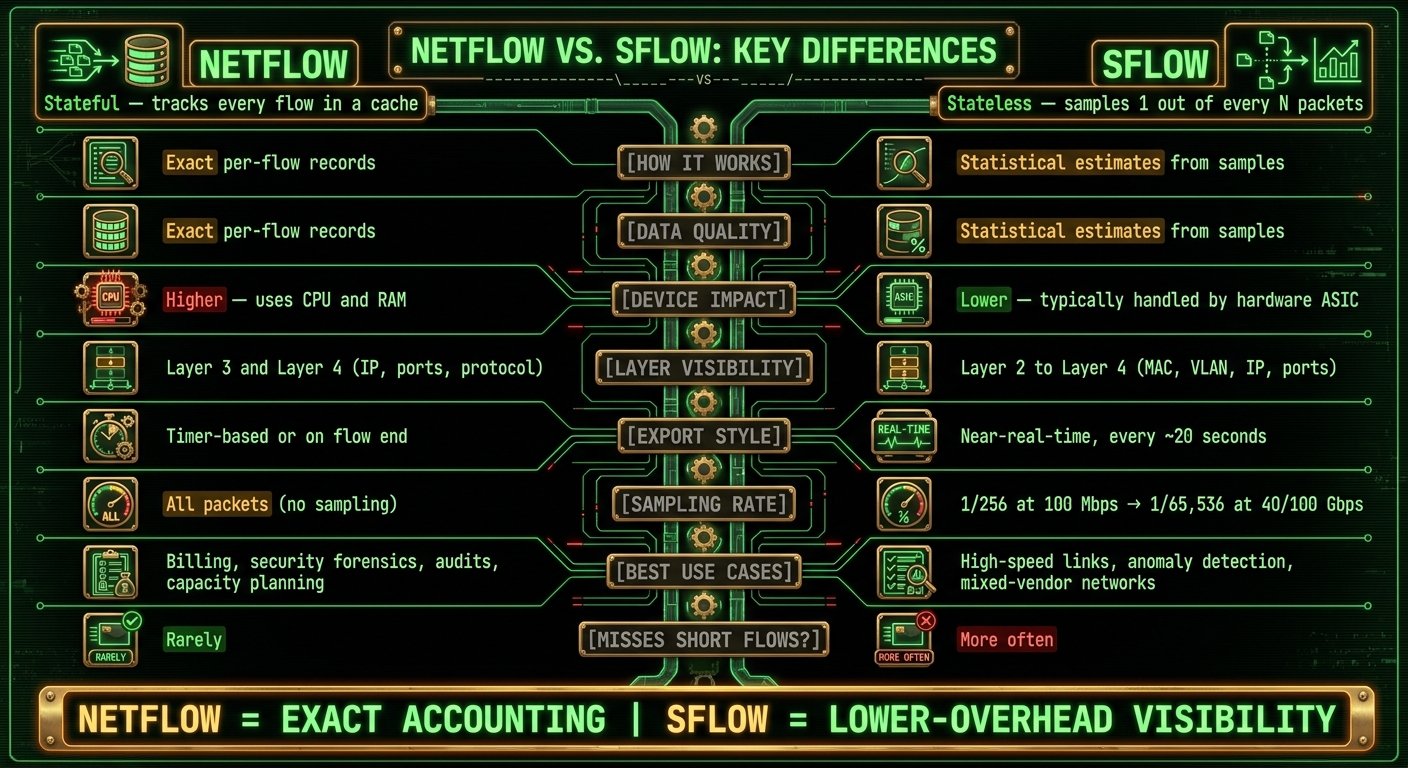
NetFlow vs. sFlow: Side-by-Side Comparison
NetFlow, sFlow, and IPFIX - What's the difference?
sbb-itb-342b8b2
How NetFlow Works
NetFlow uses stateful flow monitoring. In plain English, a router or switch keeps a flow cache, checks each packet against flows it already knows about, and creates a new record when it needs to [3].
A flow is usually identified by a set of fields such as source and destination IP address, source and destination port, protocol, DSCP/ToS, and the ingress interface [2][3].
Flow Records, Caches, and Export Timing
NetFlow sends aggregated flow data, not raw packets. The device exports records to a collector when a session ends or when an active timer, inactive timer, or cache-limit timer triggers an export [2][3].
Those exported records can include:
- packet and byte counts
- flow start and end timestamps
- TCP flag summary
- source and destination AS numbers
- next-hop IP addresses
That export process usually uses about 1% to 5% of a device’s switching traffic [2].
NetFlow v5 uses a fixed-format 48-byte record and works with IPv4 only. NetFlow v9 moves to template-based records and adds IPv6 support. IPFIX (RFC 7011) goes further with UDP, TCP, or SCTP transport, plus variable-length fields such as URLs [2][3].
Where NetFlow Fits Best
NetFlow makes the most sense when exact accounting matters.
- Security forensics - exact flow records help trace malware command-and-control traffic or data exfiltration
- Billing and accounting - tracks usage by IP or department for cost allocation
- Capacity planning - shows traffic trends over time so you can see when and where more bandwidth is needed
- Top talkers and troubleshooting - shows which IPs or applications are using the most resources
There’s a tradeoff, though. Keeping the flow cache takes CPU and RAM on the device itself [1][3]. On busy links or lower-end hardware, that overhead can turn into a hard limit.
That level of accuracy comes from keeping state on the device, and that’s exactly the tradeoff sFlow avoids with sampling.
How sFlow Works
sFlow is stateless. It samples one packet out of every N packets and exports the header right away, without keeping a flow cache [3].
That makes sFlow lighter on the device. But there’s a tradeoff: the data is less complete because you’re looking at samples, not every single flow.
Packet Sampling and Counter Sampling
sFlow exports two main types of data.
- Packet sampling, also called flow samples: the device captures the first 128 bytes of a sampled packet. That’s enough to show Layer 2 through Layer 4 details, such as MAC addresses, VLAN IDs, IP addresses, and transport ports [3].
- Counter sampling: every 20 seconds, the device exports interface stats like byte counts, packet counts, and error rates [3].
Because sFlow is often built directly into the device’s ASIC, it runs at wire speed with very little CPU or memory impact [3]. That’s a big reason teams use it on busy links.
The downside is accuracy. You’re working from a sample, not a full record of all traffic. On high-volume traffic, that sample is often dependable. But short, low-volume flows can slip through the cracks.
Sampling frequency also changes as link speed goes up. It drops from about 1/256 on 100 Mbps links to as low as 1/65,536 on 40/100 Gbps links [3].
That also means more work lands on the collector. It has to piece together flow patterns from individual packet samples [3].
Where sFlow Fits Best
These tradeoffs shape where sFlow makes the most sense.
Use sFlow on high-speed links, on devices with limited resources, or in mixed-vendor networks [1][3]. Its near-real-time export can help teams spot spikes faster than timer-based flow export, which makes it a strong choice for anomaly detection and troubleshooting [3].
NetFlow vs. sFlow: Key Differences Side by Side
NetFlow is stateful. sFlow is stateless. That one difference shapes almost everything else: accuracy, device load, and how well each one handles scale.
So the choice usually comes down to this: do you want exact flow records, or do you want broad visibility with less strain on the device?
| Feature | NetFlow | sFlow |
|---|---|---|
| Collection method | Stateful flow aggregation | Stateless packet and counter sampling |
| Data type | Flow records | Sampled headers + counters |
| Accuracy model | More exact per-flow metrics | Statistical estimates based on samples |
| Visibility scope | Strong Layer 3 and Layer 4 flow visibility | Layer 2–4 visibility, with some application clues |
| Export behavior | Flow end or timer-based export | Near-real-time |
| Device overhead | Higher - requires CPU and RAM for flow cache | Lower - typically handled by the device's ASIC |
| Scalability | Good, but may need tuning on very busy links | Often easier to scale on high-speed networks |
| Best fit | Exact usage records, investigations, accounting | Fast trend detection, broad visibility, low-impact monitoring |
Accuracy, Visibility, and Troubleshooting Tradeoffs
NetFlow gives you full per-flow accounting. That makes it a strong fit for billing, security forensics, and detailed top-talker analysis, where even one missed flow can change the picture. sFlow gives up some of that completeness in exchange for speed and broader reach.
The visibility difference matters too. NetFlow mostly stays at Layer 3 and Layer 4, so you're mainly looking at IP addresses, ports, and protocol data. sFlow samples the first 128 bytes of each packet, which means it can expose MAC addresses, VLAN tags, and limited application clues that NetFlow just doesn't see [1][3].
That extra packet-level view helps when you're tracking down Layer 2 trouble, like loops or VLAN-tagging issues [3]. In plain English, if the problem lives closer to the switching layer, sFlow can give you clues that NetFlow may miss.
But there's a catch. Because sFlow relies on sampling, it can miss short-lived flows, slow data exfiltration, and spotty DNS bursts [3]. For security teams looking for low-volume exfiltration, that's not a small issue.
Performance and Scalability on Busy Networks
Exporting flow records usually takes between 1% and 5% of a device's switching capacity [2]. On a busy network, that overhead can turn into a hard limit.
sFlow avoids much of that because sampling is often done in hardware (ASIC) instead of on the CPU. Sampling rates usually change with link speed: about 1/512 to 1/2,048 on 1 Gbps links, then down to roughly 1/8,192 to 1/65,536 on 40/100 Gbps links [3].
That keeps the device relatively light. The work shifts somewhere else instead - to the collector. Instead of receiving ready-made flow records, the collector has to piece together traffic patterns from raw packet samples. It's a bit like getting snapshots instead of a full play-by-play.
Choosing the Right Protocol for Your Environment
If you need exact accounting, billing, or security investigations, NetFlow is usually the better pick. If you're working with rural, high-speed, or mixed-vendor networks, sFlow is often the more practical option [3].
Neither one wins in every case. Before you roll anything out, tune the sampling rate, export interval, and collector capacity.
Implementation Basics and Final Takeaways
Once you know which protocol fits your network, the next step is tuning export and sampling so the data stays useful.
What to Tune Before Deployment
Before deployment, sync exporter and collector clocks with NTP so timestamps line up in your reports [3]. If the clocks drift, your data can get messy fast.
From there, NetFlow/IPFIX and sFlow need different tuning.
For NetFlow/IPFIX, tune active timeout, inactive timeout, cache size, and template refresh interval. Cache size matters because a full cache can force early exports. The goal is to balance detail against device load [2][3].
For sFlow, the main control is the packet sampling rate. A common starting point is 1/512 on 1 Gbps links, then dropping to 1/8,192–1/65,536 on 40/100 Gbps links [3]. The counter polling interval defaults to 20 seconds, and that works well for most deployments [3]. Push sampling too hard, and you can swamp the collector with samples. It also affects how much you can see from short flows [3].
NetFlow uses more device state, but gives you more exact records. sFlow gives up some completeness to keep overhead lower.
Here is the deployment difference in one view.
| Setting area | NetFlow or IPFIX | sFlow |
|---|---|---|
| Main tuning controls | Active timeout, inactive timeout, cache sizing, and template refresh [2][3] | Packet sampling rate and counter polling interval [3] |
| Device impact and collector needs | Scales with flow count, cache pressure, and export timers; collector handles flow record parsing and template decoding | Scales with sample rate and polling frequency; collector reconstructs traffic patterns from packet samples |
| Tuning tradeoff | Shorter timeouts improve detail but increase export volume | Lower sample rates reduce load but reduce precision |
Place the NetFlow collector close to the exporter, ideally one hop away, because UDP does not retransmit lost packets [2].
Conclusion: The Short Version
With the settings tuned, the choice comes back to use case.
NetFlow = exact accounting.
sFlow = lower-overhead visibility.
Choose based on hardware support, monitoring goal, and collector capacity [2][3].
FAQs
Can I use NetFlow and sFlow together?
Yes. Both monitor network traffic, but they do it in different ways.
NetFlow records detailed data about active traffic flows. sFlow samples packets instead.
Because sFlow relies on sampling, it uses fewer hardware resources. NetFlow gives you a more complete record of connections, while sFlow gives broader visibility because it includes full packet headers.
How do I choose the right sFlow sampling rate?
NetFlow and sFlow track network traffic in different ways.
NetFlow records and groups data for each active flow. sFlow, on the other hand, looks at only a sample of packets, often every _n_th packet.
The right choice depends on your infrastructure, vendor support, and how you weigh resource use against reporting detail. NetFlow gives you deeper, session-level detail. sFlow uses fewer resources and gives you broader visibility by including full packet headers from sampled traffic.
When does IPFIX make more sense than NetFlow?
NetFlow and sFlow both track network traffic, but they do it in different ways. NetFlow records and groups detailed data for each active flow. sFlow, by contrast, samples every nth packet on each interface, which gives you a broader view with less strain on the device.
If you want full flow-level visibility, NetFlow is usually the better choice. If lower hardware load matters more and you need statistical monitoring across layers 2 through 7, sFlow often makes more sense.
Current contact path
Need custom apparel or scoped help?
Use the contact form; removed product, checkout, research, and newsletter funnels stay offline.