Loading…
How to Isolate Your Router with DD‑WRT (Advanced Guide)
By weirdtoo·July 24, 2026·11 min read
Learn DD-WRT router isolation with a 3-network setup that separates router admin, home devices, and IoT on one router.
How to Isolate Your Router with DD‑WRT (Advanced Guide)
Most small networks are flat by default. Your laptops, phones, smart TVs, printers, cameras, and the router that controls everything often sit in environments that are far more trusting than they should be.
That works - until one weak device becomes everyone else’s problem.
In this advanced DD-WRT walkthrough, Richard Lloyd demonstrates a practical way to separate the router itself from the rest of the network, while also moving the primary home network onto a different subnet and keeping IoT devices isolated. The result is a cleaner, more defensible setup: your admin interface is no longer casually reachable from Wi-Fi or regular LAN ports, and higher-risk devices stay contained.
For small business owners, consultants, rural operators, and solo teams, this matters for a simple reason: every unmanaged device is a possible failure point. If your office printer, guest TV, camera system, or smart plug gets compromised, a flat network gives that device too much visibility. Segmentation reduces blast radius.
This article explains what the video sets up, how the configuration works, and what operational lessons are worth carrying into your own network design.
Key Takeaways
- Put the router admin network on its own subnet so ordinary users and devices cannot reach the management interface.
- Reserve one physical LAN port for administration only if you want stronger control over who can access DD-WRT.
- Move your everyday LAN and Wi-Fi clients to a separate bridge and subnet, rather than leaving them on the router’s default network.
- Use network isolation for client segments so they can reach the internet without being able to directly touch router management.
- Keep IoT on its own isolated segment because those devices are often the least trustworthy on the network.
- Add an unmanaged switch if you need more ports; segmentation does not require expensive enterprise gear to be useful.
- Reboot and test each port and SSID after changes to confirm devices land on the right subnet and cannot reach the admin IP.
- Think in roles, not just devices: admin, trusted work devices, IoT, and possibly guest or business-only traffic should not all live together.
sbb-itb-342b8b2
What Problem This Configuration Solves
The video is part of a longer DD-WRT series, but the core problem here is easy to understand.
A default router setup usually puts everything on one network. Even if you already created a separate IoT area, the router itself may still be exposed to parts of the environment that do not need management access.
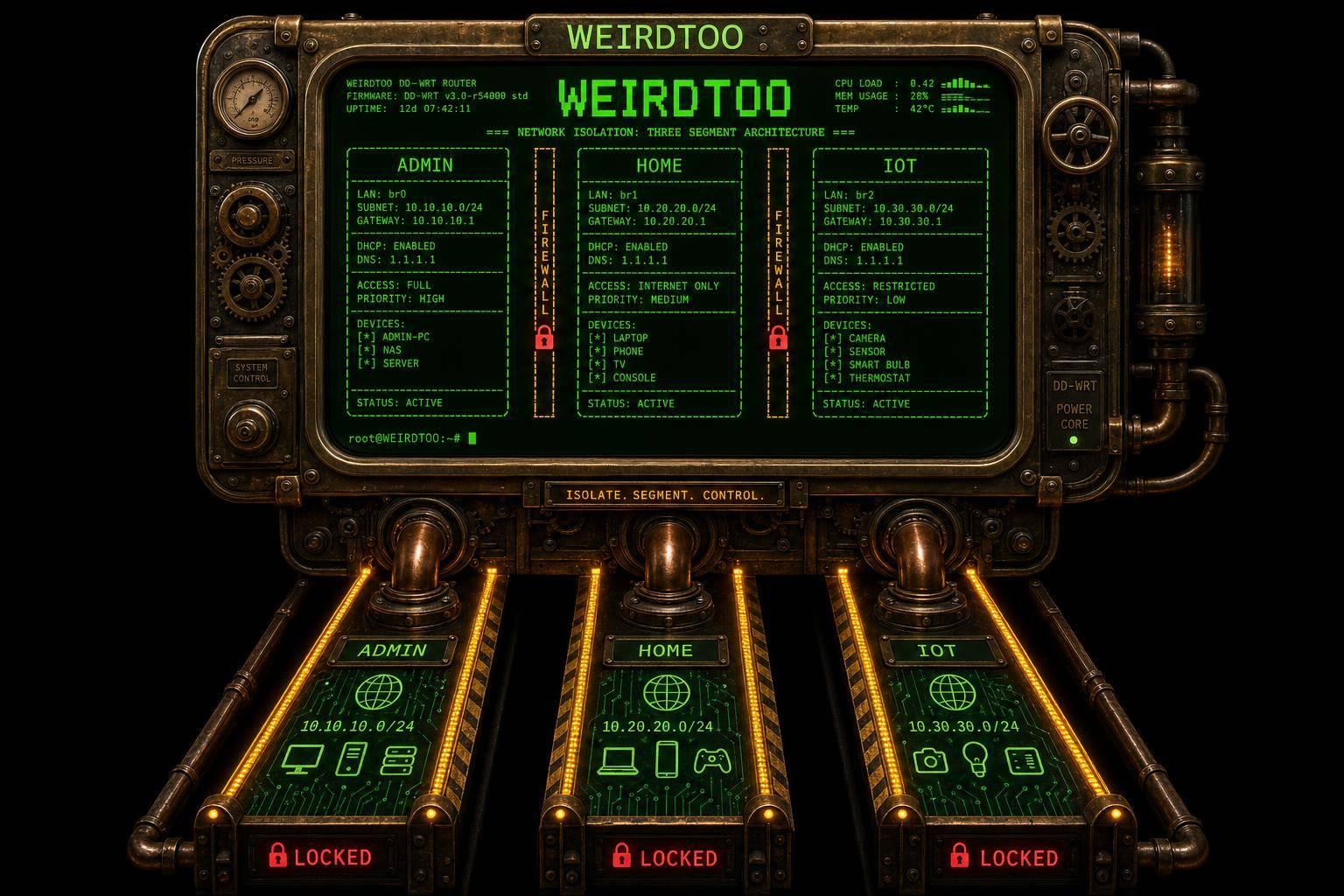
Richard’s goal is to fix that by creating three distinct zones:
- Router admin network on
192.168.1.1 - Primary home/client network on
192.168.20.1 - IoT network left on its already isolated bridge from the earlier setup
The important shift is this: the router stops being just another reachable device on the main network. Instead, it lives in its own management-only space, accessible only through a dedicated physical port.
For many operators, that is the biggest idea in the whole video.
Why This Design Is Better Than a "Mostly Secure" Setup
A lot of people stop after creating a guest network or separating smart devices. That is better than nothing, but it still leaves two common weaknesses:
1. The router is still reachable
If your management page can be reached from the same network as ordinary devices, then any compromised device may get the chance to probe, brute-force, exploit, or misconfigure it.
2. Trusted devices are still overly trusted
If all normal endpoints share one broad network with minimal segmentation, one infected laptop can scan others, hit file shares, or move laterally.
The video improves the first issue directly. It also creates a cleaner foundation for solving the second issue later with more segmented networks.
From a small-business perspective, this is less about paranoia and more about operational containment. A smart thermostat should not have the same network posture as your bookkeeping laptop. A guest tablet should not sit in the same space as a machine holding client files.
The Target Topology in Plain English
Here is the layout Richard builds:
Admin network
- Subnet:
192.168.1.0/24 - Router IP:
192.168.1.1 - Physical access: only through LAN port 1
- Purpose: management only
Main LAN + Wi-Fi network
- Subnet:
192.168.20.0/24 - Gateway:
192.168.20.1 - Assigned to: LAN ports 2, 3, and 4, plus the standard Wi-Fi radios
- Purpose: everyday trusted devices
IoT network
- Already isolated from earlier steps in the series
- Intended for smart devices that should only reach the internet or vendor services
- Kept separated from both the admin and main client networks
That design is notable because it uses physical port assignment plus virtual bridges. In practice, that gives you a surprisingly strong form of separation on low-cost hardware.
What Richard Configures in DD-WRT
The implementation happens mostly in the Networking section of DD-WRT.
At a high level, the process is:
- Create a new bridge
- Assign selected LAN ports to that bridge
- Move the main Wi-Fi interfaces to that same bridge
- Give the bridge its own IP/subnet
- Enable network isolation
- Add a DHCP server for the new subnet
- Reboot and test
That sounds straightforward, but the implications are bigger than the steps themselves.
Step 1: Create a new bridge for the main client network
Richard creates BR2, describing bridges as something like virtual routers. That is a useful mental model.
In consumer networking terms, a bridge here becomes a logical container for a set of interfaces that should share a network identity.
Instead of leaving the main network attached to the default bridge, he creates a separate one for the trusted client environment.
Step 2: Move LAN ports 2, 3, and 4 into BR2
The key physical decision is to leave LAN port 1 behind on the default router bridge.
That means:
- LAN 1 remains tied to router management
- LAN 2–4 become ports for the everyday client network
This is one of the smartest choices in the setup because it introduces a real-world control point. If someone wants admin access, they need to be physically present and plugged into the designated port.
That is not perfect security, but it is meaningful security.
Step 3: Move standard Wi-Fi interfaces into BR2
Richard also moves the regular wireless interfaces into the new bridge so that Wi-Fi clients join the 192.168.20.x network instead of the admin subnet.
This matters because it avoids a common mistake: segmenting wired clients while accidentally leaving Wi-Fi management exposure in place.
Once the radios are moved, normal wireless users are effectively treated like normal LAN users on the main client network - not as potential router administrators.
Step 4: Assign a new subnet
BR2 gets a new address:
- Bridge IP:
192.168.20.1 - Mask:
/24
That creates a new private network with the expected pool size for a small environment.
In practical terms, every device on the main LAN/Wi-Fi side now gets an address in the 192.168.20.x range, while the router admin side stays in 192.168.1.x.
That separation is the whole point. A subnet boundary is not just cosmetic. It helps define where traffic belongs and what should be routable.
Step 5: Enable Net Isolation
Richard emphasizes the Net Isolation setting, and rightly so.
This feature is what prevents users on the client segment from directly reaching the router management network. In his testing, devices on the 192.168.20.x network could still access the internet, but attempts to load 192.168.1.1 timed out.
That is the intended behavior.
If your business uses DD-WRT in a mixed environment - office gear, personal devices, guest access, smart devices - this is one of the cleanest wins available: people can use the network without being able to touch its control plane.
Step 6: Add DHCP for the new bridge
A new bridge without DHCP is not much use to most client devices.
Richard adds a DHCP server entry for BR2 so clients connected to LAN ports 2–4 or the moved Wi-Fi radios automatically receive addresses on the new subnet.
This is the kind of detail that often gets missed in homemade network segmentation. Creating the bridge is not enough; devices also need:
- IP leases
- the correct gateway
- workable DNS pathing
Without DHCP, the segment may exist but feel "broken" to end users.
Step 7: Reboot and test every path
After saving and applying the changes, he reboots the router and verifies:
- Port 1 still lands on
192.168.1.x - Ports 2, 3, and 4 land on
192.168.20.x - Standard Wi-Fi joins
192.168.20.x - Internet access works from the main network
- Access to
192.168.1.1fails from the main client segment
That testing flow is worth copying exactly.
Too many network changes are "declared successful" before anyone verifies the actual outcomes.
The Most Valuable Lesson: Separate Management from Consumption
The technical steps matter, but the deeper lesson is architectural:
The devices that use the network should not automatically be able to administer the network.
That principle scales well beyond homes.
For example:
- A consultant’s client laptop should not sit next to router management.
- A front-desk device at a rural venue should not have the same access as infrastructure gear.
- A family tablet should not share management visibility with the router and NAS.
- A point-of-sale tablet should not live in the same reachable space as cameras and smart TVs.
Even if you never build five subnets, simply separating admin, trusted work devices, and IoT is already a serious improvement.
Why This Matters for Small Businesses and Lean Teams
This configuration is especially useful for smaller organizations because they often have enterprise-like risk with consumer-grade habits.
That sounds harsh, but it is common.
A small office might have:
- two laptops with sensitive client data
- a consumer printer
- IP cameras
- smart speakers
- personal phones
- a thermostat
- maybe a guest SSID
- and no real segmentation
That is a lot of trust placed in cheap devices and default behavior.
The DD-WRT approach shown in the video helps because it offers a middle ground:
- more control than stock firmware
- lower cost than managed enterprise gear
- enough flexibility to build practical boundaries
For lean operators, the real value is not novelty. It is risk reduction without a complete rebuild.
A Note on Physical Security vs Network Security
One of Richard’s strongest opinions in the video is that router administration should require plugging directly into the correct LAN port. That may sound inconvenient, but the tradeoff is intentional.
His logic is simple: if you cannot physically access that port, you should not be able to access the admin interface.
That approach makes sense in environments where:
- the router is in a reasonably controlled location
- admin changes are infrequent
- convenience is less important than reducing exposure
For some users, however, there is a practical tradeoff.
Benefits
- Harder for malware on the main network to hit the router UI
- Strong separation between daily traffic and admin plane
- Easier to reason about who has access
Costs
- Less convenient for remote administration
- Troubleshooting requires local access
- Nontechnical users may find the design confusing later
For a home office or small shop, this is often acceptable. For a distributed team or unattended site, you may need a different management strategy. The video does not cover those alternatives in detail.
Performance: Segmentation Does Not Have to Mean Slow
An easy myth to believe is that a more segmented network will feel slower or more fragile.
That is not what Richard demonstrates.
His testing shows:
- the main client network still gets online normally
- Ethernet performance remains strong
- Wi-Fi performance remains strong
- segmentation mainly changes reachability, not basic usability
That distinction matters. Good network design is not just about blocking things. It is about allowing the right traffic while denying what should never have been reachable in the first place.
Why IoT Segmentation Should Be the Default, Not the Upgrade
Richard treats IoT as the most likely category to cause trouble, and that is a sensible assumption.
Not every smart device is insecure, but many have one or more of these issues:
- infrequent firmware updates
- unclear vendor support
- poor visibility into what they transmit
- weak admin practices
- unnecessary cloud dependency
His isolated IoT design aims to let those devices "call home" without giving them broad local access.
That is the right default mindset.
If a device only needs internet access to function, it does not need visibility into:
- your laptops
- your storage
- your admin panel
- your business systems
For small businesses, that same logic applies to digital signage, lobby TVs, low-cost cameras, smart locks, breakroom devices, and many printers.
The Hidden Win: This Setup Makes Future Segmentation Easier
Near the end of the video, Richard points out that this is not the end state. Once the router is isolated and one client network is moved off the default bridge, you have a pattern you can repeat.
That is the strategic payoff.
The moment you understand:
- bridge creation
- interface assignment
- per-bridge subnetting
- isolation
- DHCP mapping
you can start designing around functions instead of just ports.
That could mean:
- a dedicated business network
- a kids-only network
- a guest network
- a tenant or shared-space segment
- a workshop/lab segment
The video stops short of fully building those additional networks here, but it makes the case for modular segmentation very well.
Practical Cautions Before You Try This
The video is hands-on, but there are a few operational realities worth underlining.
You can lock yourself out
If you move interfaces or subnets incorrectly, you may lose management access and need to reconnect carefully or reset the device.
Naming matters
Richard relabels interfaces clearly, which is not cosmetic. Once you create multiple bridges and DHCP scopes, bad naming leads to mistakes.
Test one layer at a time
Do not assume:
- the bridge is correct
- DHCP is running
- Wi-Fi moved successfully
- isolation works
Verify each one separately.
This depends on earlier DD-WRT setup
Some of the logic assumes the router was already configured in previous steps, especially the existing IoT bridge. If you are starting from a stock setup, not everything in the video maps one-to-one without that prior context.
Device compatibility is not deeply discussed
Richard mentions configuring Wi-Fi partly for compatibility, but exact tuning choices are not the main focus of this video.
A Clean Mental Model for Applying This in the Real World
If you are a founder, office manager, or technical generalist trying to make sense of this, use this simple hierarchy:
Network 1: Management
- Router admin only
- Limited to one wired port if possible
Network 2: Trusted work/home devices
- Laptops
- desktops
- tablets you trust
- printers you actually need locally
Network 3: IoT/untrusted convenience devices
- smart TVs
- cameras
- speakers
- plugs
- thermostats
- random app-controlled devices
If you never go beyond those three, you are already ahead of most small networks.
Conclusion
Richard Lloyd’s DD-WRT isolation method is more than a router trick. It is a strong example of a bigger principle: separate control systems from user systems, and isolate the devices you trust least.
In this configuration, the router lives on its own management subnet, accessible only through a dedicated physical port. The main home or office network moves to a different subnet with its own DHCP scope, and IoT devices remain isolated in their own segment. Internet access continues to work, but management exposure drops sharply.
For small businesses and solo operators, that is the real takeaway. Better security does not always require enterprise hardware. Sometimes it starts with a clearer network boundary, a more deliberate bridge layout, and the discipline to stop letting every device see everything.
Source: "Lock Down Your Network: Advanced Router Isolation with DD-WRT (Part 3)" - Richard Lloyd, YouTube, Jun 2, 2026 - https://www.youtube.com/watch?v=HlBAM_641vM
Current contact path
Need custom apparel or scoped help?
Use the contact form; removed product, checkout, research, and newsletter funnels stay offline.