Loading…

How QoS Improves Latency for Rural ISPs
By weirdtoo·December 22, 2025·9 min read
QoS reduces latency for rural ISPs by prioritizing voice, video and gaming, shaping traffic, and using queue management to keep networks responsive on limited links.
How QoS Improves Latency for Rural ISPs
Quality of Service (QoS) is a network tool that prioritizes time-sensitive internet traffic, ensuring smoother performance for activities like video calls, VoIP, and online gaming. For rural ISPs, where bandwidth is often limited and latency challenges are common, QoS helps by managing data intelligently to reduce delays and improve reliability. It prevents large downloads from disrupting critical tasks, making internet connections more dependable even during peak usage.
Key takeaways:
- Traffic Prioritization: Ensures important activities (e.g., VoIP, gaming) get bandwidth over less urgent tasks.
- Traffic Shaping: Controls data flow to prevent congestion and reduce latency.
- Queue Management: Techniques like WRED avoid bottlenecks by handling traffic spikes efficiently.
- Rural-Specific Solutions: Addresses challenges like slow speeds, weather disruptions, and limited infrastructure.
How to Configure QoS for Faster Gaming Internet?
How QoS Reduces Latency in Rural Networks
Quality of Service (QoS) helps reduce latency in rural networks by prioritizing and managing data traffic intelligently. Instead of treating all data equally, QoS assigns priority to critical applications, ensuring they get the bandwidth they need. This approach lays the foundation for advanced methods that streamline data flow and improve performance.
Traffic Prioritization and Shaping
Traffic prioritization involves categorizing network data and assigning importance levels. In rural areas, where bandwidth is often limited, prioritizing applications like VoIP, video conferencing, and online gaming is essential. By configuring routers and modems with QoS settings, these time-sensitive activities are given precedence, ensuring clear calls and smooth gaming, even during peak usage. Lower-priority activities, such as email or social media browsing, are allocated less bandwidth.
Traffic shaping complements prioritization by controlling the rate at which data moves through the network. This technique prevents large downloads from dominating the bandwidth, especially on slower rural connections. For instance, packet fragmentation - breaking large data packets into smaller ones - helps ensure that critical traffic flows smoothly, keeping latency under 100 ms [2].
Queue Management Techniques
Beyond prioritization and shaping, queue management plays a vital role in preventing congestion. Queue management determines how data packets are handled when traffic spikes. Traditional FIFO (First In, First Out) queuing can create bottlenecks, as large, non-critical downloads can clog the network. A better approach is Weighted Random Early Detection (WRED). Instead of waiting for buffers to overflow and dropping all incoming packets, WRED selectively drops packets early. This signals applications to slow down their transmission rates, avoiding sudden congestion and maintaining steady performance for high-priority tasks. Combining these queue management strategies with other QoS measures helps rural ISPs deliver more reliable network performance.
Step-by-Step Guide to Implementing QoS for Rural ISPs
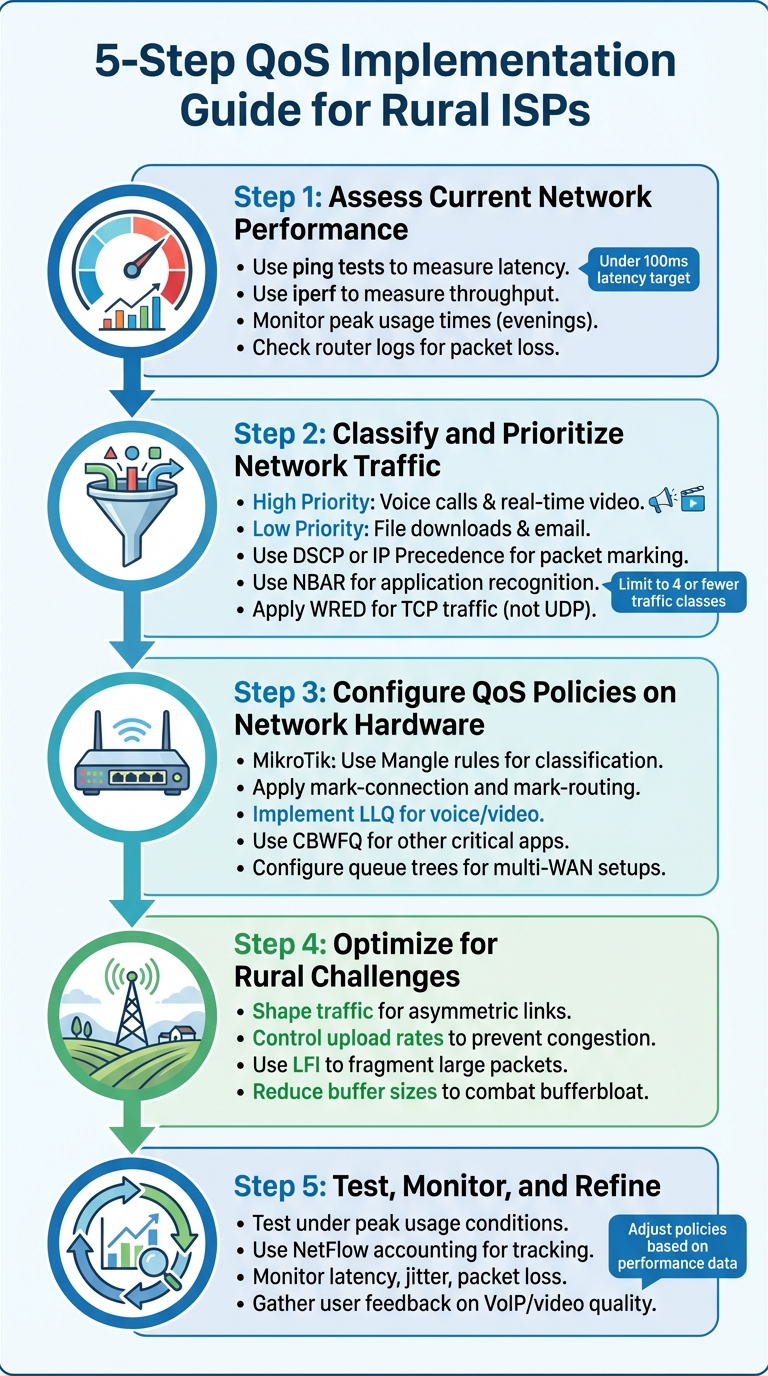
5-Step QoS Implementation Guide for Rural ISPs
To get the most out of Quality of Service (QoS) in rural networks, a structured approach is essential. This process involves evaluating current performance, categorizing traffic, configuring hardware, addressing rural-specific challenges, and ongoing monitoring. Each step builds on the last, creating a robust framework for improving network performance and user experience.
Step 1: Assess Current Network Performance
Start by analyzing your network's current state. Measure latency and pinpoint bottlenecks using tools like ping tests, which track how quickly data packets travel between customer devices and your server. Aim for a latency under 100ms, as this is generally acceptable for most online activities [2].
For a more detailed view, use tools like iperf to measure throughput and check router logs for packet loss. Pay special attention to peak usage times, such as evenings, when streaming and gaming traffic often spike. Rural networks, which often share nodes, are particularly prone to congestion during these hours [2]. Document these patterns to identify where QoS can have the greatest impact.
Step 2: Classify and Prioritize Network Traffic
Once you understand your network's performance, the next step is to separate traffic based on priority. Applications like voice calls and real-time video need immediate attention, while activities like file downloads or email can handle slight delays. Use tools like DSCP (Differentiated Services Code Point) or IP Precedence to mark packets at the network's entry point, ensuring priority labels remain intact as they move through the system.
For deeper insights, utilize Network-based Application Recognition (NBAR) to identify specific applications beyond just port numbers. Keep traffic classes simple - limit them to four or fewer. For TCP-based traffic like web browsing, Weighted Random Early Detection (WRED) can help manage congestion by dropping packets early to trigger TCP's slow-start mechanism. However, avoid WRED for UDP traffic, such as voice calls, since UDP doesn't adjust to packet loss. Instead, use techniques like policing or tail-drop to manage these flows.
Step 3: Configure QoS Policies on Common Network Hardware
If you're using MikroTik RouterOS, leverage Mangle rules within the firewall to classify traffic by source IP or type. For rural networks that often rely on multi-WAN setups, combine policy-based routing with QoS. Use mark-connection and mark-routing actions in the Mangle table before applying queue trees [3]. This ensures traffic is routed correctly and prioritized effectively.
For real-time applications like voice and video, implement Low Latency Queuing (LLQ) to ensure these packets are processed first. For other critical applications, use Class-Based Weighted Fair Queuing (CBWFQ) to allocate specific amounts of bandwidth to ensure smooth operation.
Step 4: Optimize for Asymmetric Links and Rural Challenges
Rural networks often face unique hurdles, such as asymmetric bandwidth and bufferbloat. With asymmetric links - where upload speeds are slower than downloads - traffic shaping becomes critical. By controlling upload rates, you can prevent large file uploads from clogging the connection and causing latency spikes. On low-bandwidth links, use Link Fragmentation and Interleaving (LFI) to break large packets into smaller pieces. This allows time-sensitive packets to slip through without waiting for larger packets to finish.
To combat bufferbloat, reduce buffer sizes on routers and modems. Oversized buffers can hold too many packets during congestion, which increases latency and negatively impacts performance.
Step 5: Test, Monitor, and Refine QoS Policies
After setting up QoS, test your network under different conditions - such as peak usage times, varying application mixes, and changing user numbers. Tools like NetFlow accounting can help you track traffic classification and ensure packets are being prioritized correctly.
Keep an eye on performance and adjust your policies as needed. For instance, if video streaming still struggles during peak hours, consider allocating more bandwidth. If voice call quality drops, double-check that LLQ is prioritizing voice traffic. QoS isn't a one-and-done solution; it requires regular adjustments to keep up with evolving network demands in rural areas.
sbb-itb-342b8b2
Measuring the Impact of QoS on Network Performance
Start by establishing a baseline using tools like NetFlow Accounting or Network-based Application Recognition (NBAR). These tools help you measure critical metrics like latency, jitter, bandwidth usage, and packet loss. This baseline data shows how traffic moves through your network and identifies which applications are consuming the most bandwidth before implementing QoS. Once your QoS policies are in place, measure these same metrics again to evaluate improvements in delay, jitter, bandwidth efficiency, and packet loss.
Tools such as QoS Device Manager (QDM) and QoS Policy Manager (QPM) can help you monitor and manage your QoS setup. QDM provides a web-based interface to observe how routers handle advanced QoS functions, while QPM offers centralized control to track how your policies impact the network. These tools help ensure that packets are being prioritized correctly and that congestion is reduced during high-traffic periods.
It's also important to monitor router CPU usage during peak times to ensure that QoS processing doesn't overload your hardware. Before deploying configurations in a live environment, lab-test them to confirm that they effectively reduce latency. This technical validation should go hand-in-hand with user feedback to assess real-world performance.
Gather input from users on applications like VoIP, video streaming, and conferencing, as these are the areas where QoS improvements are most apparent. Pay close attention to feedback during heavy usage times. If users still report issues like dropped calls or buffering, it may indicate that your prioritization rules need fine-tuning. Adjusting these rules ensures your QoS policies are achieving their intended effect.
"QoS improves user experience by ensuring that traffic is snappier and there's less interference from other types of traffic on the network" - Planet Technology USA [1]
When complaints about buffering videos or interrupted calls disappear, you'll know your QoS policies are working as intended.
Conclusion: How QoS Improves Rural ISP Performance
By following the steps outlined, Quality of Service (QoS) significantly enhances the performance of rural ISPs by making the most of limited resources. It works by prioritizing critical applications, such as VoIP and video conferencing, over less time-sensitive activities, ensuring that underserved communities can maintain vital communications without sacrificing connectivity. This is particularly crucial given the reliance on DSL (11-40ms latency), cable (13-27ms), or satellite (up to 600ms) - all of which are prone to congestion challenges [2].
For rural small businesses, QoS ensures that essential tools like CRM and ERP systems get the bandwidth they need, avoiding disruptions caused by non-essential traffic like residential streaming. Even minor delays - such as 100ms - can lead to a 7% drop in eCommerce conversion rates [4][5]. When expanding bandwidth isn't an option due to physical or financial constraints, QoS steps in to manage the existing infrastructure, prioritizing time-sensitive data and ensuring smoother performance during peak usage. This approach helps bridge the connectivity gap for rural areas.
The benefits are clear: fewer dropped calls, smoother video conferences, and reduced buffering during high-traffic periods. For communities that share infrastructure, like neighborhood cable nodes prone to congestion, QoS minimizes these bottlenecks by managing bandwidth competition. This allows rural users to prioritize critical activities, such as telehealth consultations or online education, even when multiple devices are connected to the same network [2].
Rather than simply increasing speed, QoS focuses on optimizing existing connections. By reducing jitter, minimizing packet loss, and managing traffic intelligently, rural ISPs can provide reliable connectivity that supports modern applications - all without the need for expensive infrastructure upgrades.
FAQs
How does QoS help rural ISPs improve network performance and reduce latency?
Quality of Service (QoS) plays a crucial role for rural ISPs by prioritizing important traffic, such as video calls and streaming, to ensure these activities get the bandwidth they require. This helps tackle common challenges like delay, jitter, and packet loss - issues that are often more noticeable in rural areas where network capacity is limited.
Unlike urban networks, which typically enjoy ample bandwidth, rural ISPs frequently deal with high-latency connections. QoS helps them make the most of their resources by efficiently allocating bandwidth, resulting in a smoother and more dependable experience for users. For underserved communities, this consistent connectivity can make a big difference in everyday activities and overall quality of life.
How does QoS help rural ISPs tackle common network challenges?
Rural ISPs often deal with challenges like limited bandwidth, high latency, and network congestion. These issues can cause packet loss, jitter, and poor performance, especially for critical services such as voice and video calls. This is where Quality of Service (QoS) comes into play - it prioritizes time-sensitive traffic, helping to ensure smoother performance for essential applications.
By implementing QoS, rural ISPs can fine-tune their networks to minimize delays and provide a more dependable internet experience. This is particularly crucial in underserved areas, where reliable internet access is essential for activities like education, remote work, and staying connected.
What steps can rural ISPs take to implement QoS and reduce latency?
Rural ISPs can improve their networks by using Quality of Service (QoS) to prioritize critical traffic and minimize latency for their users. The first step is to identify applications that are sensitive to delays, such as VoIP, video streaming, or online gaming. Once identified, traffic can be grouped by priority - for example, high-priority voice traffic versus lower-priority best-effort data. These classifications allow ISPs to apply traffic policies on network devices like routers, ensuring that each group gets the appropriate level of service.
ISPs can further enhance performance by implementing rate limits at the network's edge, managing bursty traffic, and applying these traffic rules consistently across the network. This approach enables better performance without requiring a complete infrastructure overhaul. Regular monitoring and adjustments are key to maintaining low latency and reliability as traffic demands shift. Companies like WEIRDTOO, which serve underserved areas, demonstrate how QoS can be a critical tool in providing stable and improved internet connectivity.
Current contact path
Need Weird Network WiFi, custom apparel, or scoped help?
Use the contact form; removed product, checkout, research, and newsletter funnels stay offline.