Loading…

Guest WiFi Consent: What You Must Tell People Before They Connect
By weirdtoo·October 12, 2026·7 min read
Tell guests who runs the network, what data is collected and retained, how it's used, and keep marketing opt‑ins separate.
Guest WiFi Consent: What You Must Tell People Before They Connect
I keep three things separate: WiFi access terms, the privacy notice, and optional marketing permission. Before your guest connects, tell them who runs the network, what data it collects, and what happens to that data. An unchecked offers box is a choice. “Connect and receive offers” is a trap.
Here’s what I check before putting a portal in front of your guests:
- Data practices: Explain collection, monitoring, uses, recipients, retention, and deletion options. Don’t call identifiable device or browsing data “anonymous.”
- Access rules: State required fields, network limits, and prohibited activity. Check that your ISP permits guest access.
- Marketing choices: Use separate, unchecked email and text options. Guests must be able to skip both and connect.
- U.S. legal duties: Check applicable state privacy rules, location-data controls, email and text requirements, children’s privacy, and security duties. There is no single U.S. consent template.
- Live testing: Check the portal on a phone and laptop. Test notice links, consent records, unsubscribe flows, and vendor settings. Assign one person to fix failures.
<u>I don’t promise a feature until I’ve checked it.</u> That includes WEIRDTOO’s Weird Network. A privacy notice is not a settings panel.
What to Disclose Before Connection
Put the notice on the first portal screen, before guests connect. Make Terms of Service and Privacy Policy links available before login or submission of personal data. A policy guests can only read after signing in is too late. [3][4]
Name the Operator and Explain Data Collection
Name the venue and WiFi provider. Separate the information guests type in from the data the system collects automatically. Mark each registration field required or optional, and explain why you need each required field.
Describe what you actually do with the data: transmit the service, protect the network, troubleshoot problems, compile performance statistics that do not identify anyone, save preferences, or build marketing profiles. Use plain labels and explain each use in everyday language. Do not list uses your setup does not support. [3][4]
Make sure those disclosures match your retention rules and who receives the data.
State Retention, Recipients, and Guest Choices
Start with your provider settings and contract - not a generic policy copied from somewhere else. State what you collect, who receives it, and how long you keep it or what triggers deletion. Explain how guests can request deletion and which data they can ask you to erase. [3][5]
Tell guests how to get other privacy help, withdraw optional permissions, or unsubscribe. Make clear whether they must register and which details they can skip. [3][5]
Explain Monitoring and Usage Limits
Check what the portal and network actually log before writing the notice. State whether the WiFi system logs browsing activity or unique IDs, and whether it uses that data for access, security, analytics, or marketing profiles. [1][2][3]
If you include liability language, keep it plain and tied to the network’s actual risk. Put session limits, device limits, bandwidth caps, and prohibited activity in the access terms. State any service limits and device-security steps. Check that your ISP agreement permits guest access. [1][2][3]
sbb-itb-342b8b2
Keep Marketing Permission Separate From WiFi Access
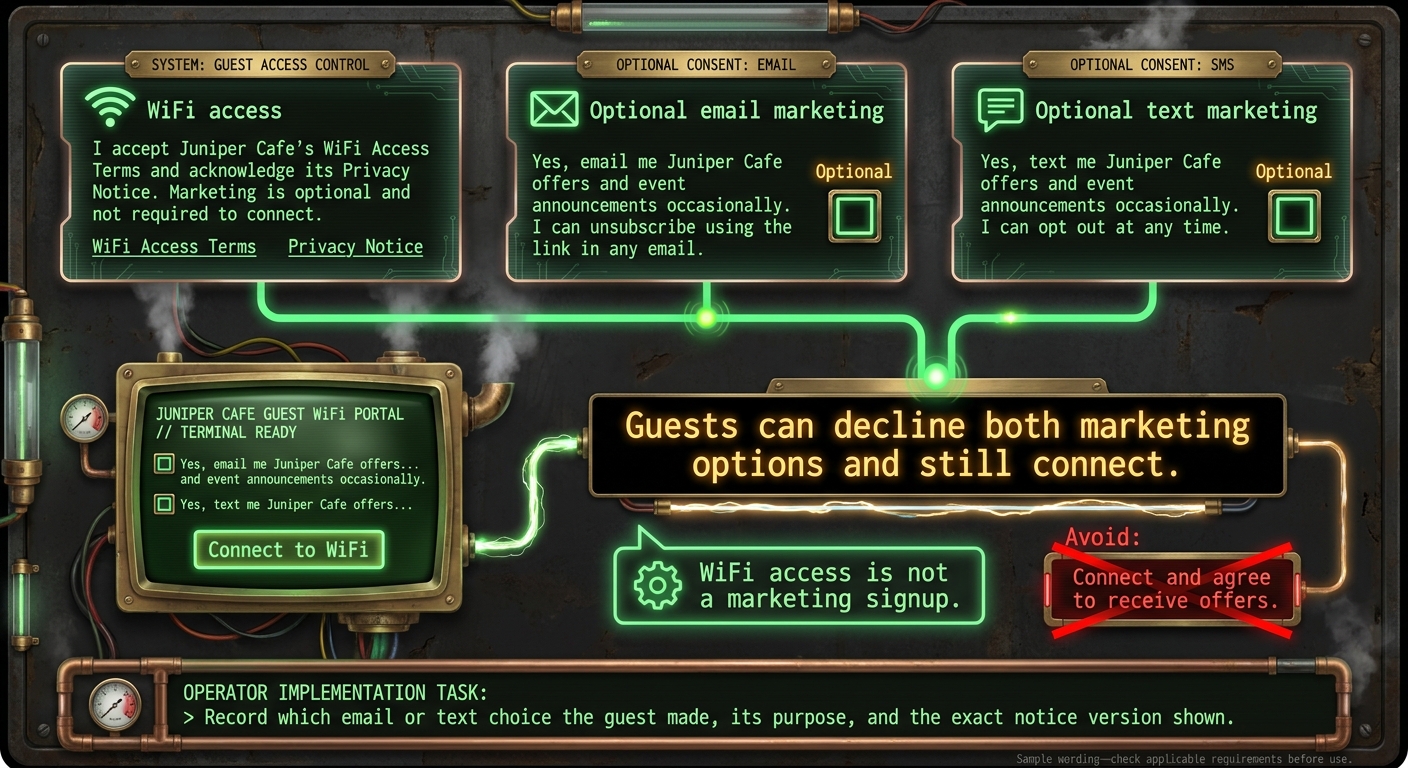
Guest WiFi Access vs. Marketing Consent
After the disclosure, keep the marketing choice separate from the connect button. WiFi access is not a marketing signup.
Give optional marketing its own control. Avoid wording like “Connect and agree to receive offers.” [3][4]
Use Separate, Unchecked Email and Text Options
Give guests two separate, unchecked choices: one for email marketing and one for text marketing. They must be able to decline both and still connect. Keep the required WiFi access step separate from either option.
Record which email or text choice the guest made, its purpose, and the exact notice version shown. [3][4]
Provide Sample Access and Marketing Wording
Use wording like this:
Access acknowledgment: I accept Juniper Cafe’s WiFi Access Terms and acknowledge its Privacy Notice. Marketing is optional and not required to connect.
Optional email marketing: Yes, email me Juniper Cafe offers and event announcements occasionally. I can unsubscribe using the link in any email.
Optional text marketing: Yes, text me Juniper Cafe offers and event announcements occasionally. I can opt out at any time.
Check Which U.S. Laws Apply
Start with the disclosures above. Then add any state or federal rules that change your portal’s notice, opt-out, or consent language.
Review State Privacy Laws and Marketing Rules
Before you publish the portal, check which U.S. laws apply to your setup. Have local counsel confirm current coverage thresholds, effective dates, and required wording. Focus on what needs to change on the screen - not every line of the statute.
| Topic | Trigger | What to do |
|---|---|---|
| State privacy laws | Applicable state coverage and processing thresholds | Add required state notices and rights links. |
| California sale/sharing | Covered businesses that sell or share guest data | Add applicable “Do Not Sell or Share” controls. |
| Sensitive data | Covered sensitive-data processing, including precise WiFi-derived location data | Add required consent or other controls before covered processing starts. |
| Commercial email | Commercial email sent to guests | Follow CAN-SPAM rules for sender identification, address, and unsubscribe options. Keep email marketing permission separate from WiFi access. |
| Marketing texts | Guest text-marketing sign-ups | Check applicable SMS marketing requirements, including any state-specific consent language. |
| Children’s privacy | COPPA-covered collection | Provide required notice and a verifiable parental-consent flow, or avoid covered collection. |
| Security and breaches | Applicable data-security and breach-notification laws | Describe only safeguards and retention practices your setup can deliver. |
Precise location data derived from WiFi can bring extra state-law duties. Check what your portal vendor collects and receives before you write the disclosure. The vendor’s data handling matters, not just what you see in your dashboard.
Check Children's Privacy and Data Security Duties
A family-friendly venue does not automatically fall under COPPA. COPPA applies to child-directed online services and services with actual knowledge that they collect personal information from children under 13. That can include some persistent identifiers. For covered collection, provide the required notice and obtain verifiable parental consent before collection starts.
Keep guests on the guest network. Give logs a defined purpose and retention period. State breach-notification laws may apply if sensitive information is exposed.
Do not promise safeguards or deletion schedules your setup cannot deliver. A sentence in a privacy notice does not make the system do it.
Final Checklist: Test the Portal and Update Notices
Check the live portal against the disclosures above. The preview is not proof that your guest WiFi works as described.
Test Before Launch and After Changes
Use a phone and a laptop on the actual guest network, not just the portal preview. Retest after any change to the portal, vendor, policy, or marketing.
- [ ] Required disclosures appear before connection.
- [ ] The Privacy Notice and required manage/opt-out links load before the guest finishes connecting. [3]
- [ ] Required fields are clearly labeled. Marketing options are separate and unchecked.
- [ ] Guests can decline optional marketing and still connect. [3]
- [ ] Consent records are stored as disclosed. Withdrawal and unsubscribe flows work across every connected marketing service. [3][6]
- [ ] Any promised monitoring, shaping, or rate limits work as stated. [1]
- [ ] Actual collection, recipients, retention, and sharing settings match the notice across every connected marketing service.
Assign one person to handle verification prompts and guest support. Someone needs to own the work, not just the checklist.
Confirm Weird Network Features Before Mentioning Them
Describe WEIRDTOO Company’s Weird Network as a venue guest WiFi system. Mention only current, documented captive-portal and follow-up features you have verified in your venue’s live setup.
Do not claim compliance, retention controls, consent logs, or withdrawal features until you have checked both the current documentation and how the live system works.
FAQs
Which guest WiFi disclosures are legally required?
No specific U.S. federal law requires standardized guest WiFi disclosures. But if you want to maintain protections under Section 512 of the DMCA, providers are encouraged to put a policy in place for terminating repeat copyright infringers - and disclose that policy [1].
An acceptable use policy on your captive portal or splash page is standard practice, not a strict legal requirement. It usually explains monitoring, connection logging, and rules against illegal activity. The point is to help limit liability, not just give guests another screen to click through [2][1].
Do guests need to consent to security logging?
Consent requirements depend on your network provider’s legal requirements and how it runs the service. The cited sources do not require a specific consent form.
Security logging is often treated as necessary to provide the service. As an operator, you may also need to identify users to maintain safe harbor or comply with legal requests [1][2][3].
Clearly disclose security monitoring and logging in your privacy policy or terms of service.
Who handles privacy requests: my venue or WiFi provider?
The venue owner is usually your contact for guest WiFi privacy requests. They act as the data controller, deciding how your data is collected, stored, and monitored [1]. The WiFi provider supplies the infrastructure or captive portal software [1].
If you’re concerned about your data, contact venue management. They’re responsible for the guest WiFi service [1].
Current contact path
Need Weird Network WiFi, custom apparel, or scoped help?
Use the contact form; removed product, checkout, research, and newsletter funnels stay offline.