Loading…

Best Practices for Monitoring Bandwidth in Rural Networks
By weirdtoo·July 13, 2026·7 min read
Use SNMP first, add flow where needed, run local collectors, set link-specific baselines and alerts to spot rural congestion early.
Best Practices for Monitoring Bandwidth in Rural Networks
If you run a rural network, start with SNMP, add flow data only where links stay busy, and set alerts before users feel slowdowns.
I’d boil the whole article down to this: watch utilization, errors, top talkers, and changes over time. In rural networks, spare capacity is often tight, shared wireless links can get congested fast, and even a short spike can hit many users at once. That means your setup should answer four plain questions: how much is in use, who is using it, what normal looks like, and what changed when service dropped.
Here’s the short version:
- Use SNMP first for link usage, interface errors, and long-term trend lines
- Use NetFlow, sFlow, or IPFIX next when you need to see top talkers or traffic types
- Keep the monitoring stack small with graphs, alerts, and reports your team can maintain
- Use local collectors if backhaul drops often, so data is stored and sent later
- Set baselines by link, sector, and customer group instead of using one network average
- Set thresholds above normal peaks but below user pain
- Use QoS and shaping based on measured traffic, not guesses
- Troubleshoot in order: utilization, errors, flow data, then packet work only if needed
A simple rule I’d follow: if a link spends 70% to 80%+ of busy-hour capacity on a repeated basis, I’d review that segment for thresholds, policy changes, or added capacity. And if one sector spikes every evening while others stay flat, I’d treat that sector on its own instead of relying on a network-wide average.
This article is about building a monitoring setup that works when bandwidth is limited, support staff is lean, and link problems are harder to work around.
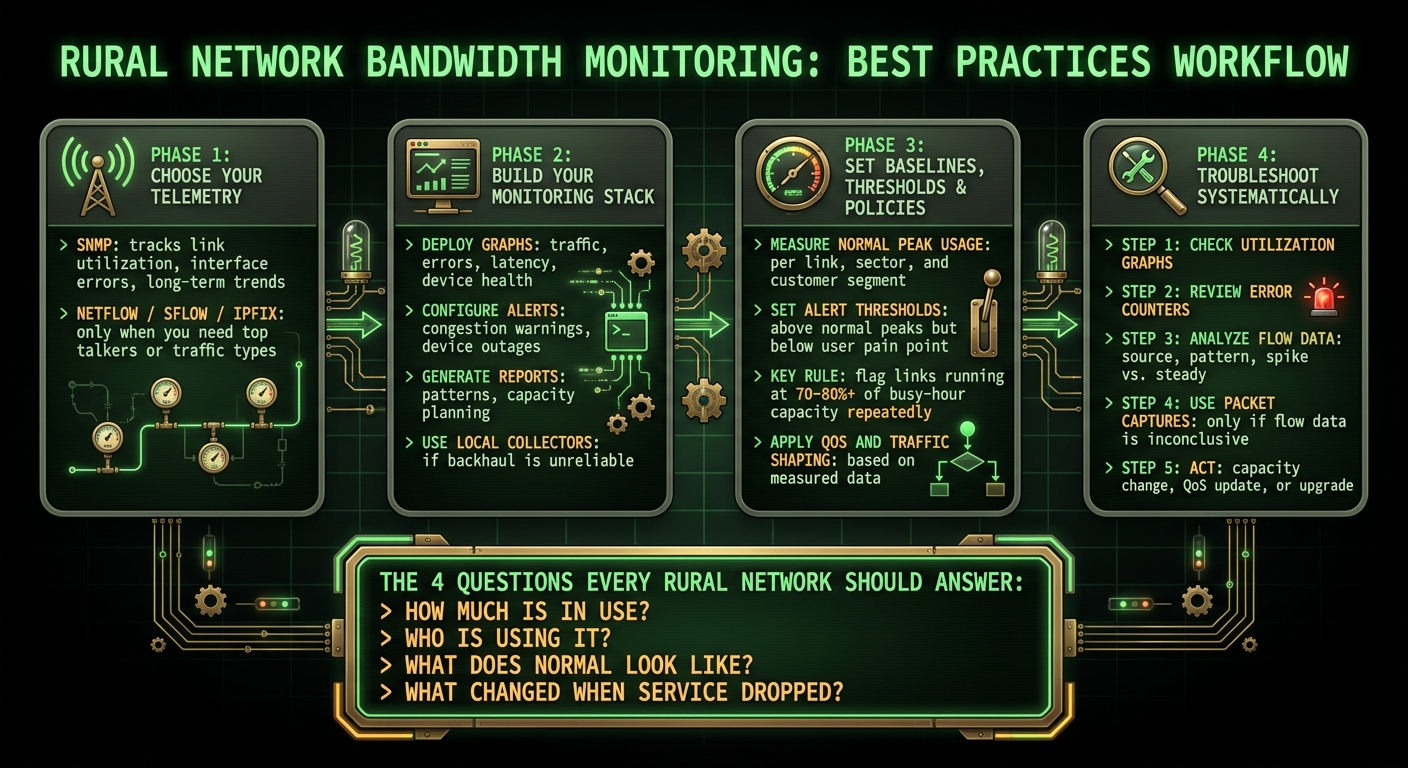
Rural Network Bandwidth Monitoring: Step-by-Step Workflow
Choose the Right Telemetry for Each Part of the Network
Not every rural network segment needs the same telemetry. The smart move is to match the telemetry to the part of the network you're watching so the data stays useful instead of noisy. In practice, those four questions split into two layers: SNMP for baseline visibility and flow data for deeper detail.
Use SNMP to Track Link Utilization, Errors, and Long-Term Trends
SNMP (Simple Network Management Protocol) is the baseline for rural monitoring. It polls interface counters with low overhead and helps you track utilization, errors, and long-term trends. Start here. Then bring in flow data only when counters stop giving you enough detail.
Use NetFlow, sFlow, or IPFIX to Find Top Talkers and Traffic Classes
When SNMP shows sustained high utilization and you need to know what's behind it, flow data fills that gap. NetFlow, sFlow, and IPFIX show top talkers and traffic classes, so you can see which devices or applications are using bandwidth on shared rural backhaul and wireless links.
SNMP vs. NetFlow, sFlow, and IPFIX: How They Differ
Use SNMP for baseline utilization and network health. Add flow telemetry only on links where you need source, destination, and application detail.
sbb-itb-342b8b2
Build a Monitoring Stack That Works Within Rural Constraints
Once SNMP and flow data are coming in, the next job is to turn that telemetry into something useful: dashboards, alerts, and reports that spot congestion before users start feeling it.
For rural sites, simpler is better. You want a small monitoring stack that can handle weak backhaul, link drops, and very little on-site help. In practice, where the stack runs matters just as much as what it displays.
Set Up Graphs, Alerts, and Reports with Open Source Tools
Start with lightweight open source tools that match the site and the way your team provides support. Don’t overbuild it on day one.
Focus on the basics first:
- Graphs to show traffic, errors, latency, and device health
- Alerts to warn you when links are congested or devices stop responding
- Reports to spot patterns over time and help with capacity planning
That small core usually gets you much farther than a bloated setup that’s hard to maintain.
Central Monitoring vs. Local Collection Points: How to Decide
If the backhaul is unreliable, move collection closer to the network edge. A local-first design makes sense when links drop or stay unstable for long stretches.
Here’s the big idea: a local collector can buffer data until connectivity comes back. That means monitoring keeps working even when the upstream link doesn’t. Distributed collectors, such as proxies or remote agents, are a good fit for this approach.
If the site has steady backhaul, central monitoring may be enough. If not, local collection is often the safer bet.
Set Baselines, Thresholds, and Policies Before Users Complain
Once your graphs and alerts are live, the next step is simple: turn all that data into rules you can act on. The monitoring data you already collect should shape your baselines, thresholds, and traffic policies.
Measure Normal Peak Usage by Link, Sector, and Customer Segment
Start with rolling peak measurements. Track normal peak usage by link, sector, and customer segment so each baseline matches actual demand on shared rural links and limited upstream capacity.
Why does that matter? Because a single network-wide average can hide what’s going on in the places that feel pressure first. One sector may run hot every evening, while another stays calm. One customer segment may push heavy video traffic, while another barely moves the needle.
Set Thresholds That Catch Congestion Early
Your thresholds should sit above normal peaks, but still below the point where users start to feel congestion. That gives you room to act before the slowdown turns into calls, tickets, and frustrated customers.
On rural wireless links, where capacity is often tight, timing matters a lot. Catching a threshold breach early can mean a quiet fix in the background instead of a service issue across an entire segment.
Apply QoS and Traffic Shaping Based on Monitoring Data
Once you know which traffic dominates a link, turn that insight into policy. Use those traffic patterns to decide what gets priority and what can be limited during busy hours.
In practice, that often means:
- Prioritizing critical traffic
- Limiting nonessential traffic during peak periods
- Protecting scarce rural bandwidth before service degrades
This way, QoS and traffic shaping aren’t guesses. They’re tied to what your network is actually doing.
Troubleshoot Systematically and Review the Network Over Time
Start with Utilization and Flow Data, Then Use Packet Captures Only When Needed
When an alert fires, follow the same path every time: utilization, errors, then flow detail.
If performance drops, start with utilization graphs and work down the stack. After that, check error counters for link faults or hardware issues.
Once you’ve confirmed the link is healthy, figure out whether the load is steady or just a short spike. Then compare it against normal peak behavior. Did traffic go past the usual high point? Did it come from a new source? Flow data helps you confirm both the source and the pattern.
Use packet captures only when flow data doesn’t show the cause.
Once the cause is clear, turn that finding into a decision about capacity, QoS, or an upgrade.
FAQs
When should I add flow monitoring?
Add flow monitoring when basic bandwidth charts stop telling the full story. It gives you a closer look at how traffic moves across the network and helps you spot dependencies between systems.
It can also support natural-language queries and path tracing between concepts by using a structured graph stored in JSON, with visual and persistent outputs you can review later.
What thresholds should I set first?
The current answer misses the point. It talks about an AI coding assistant instead of bandwidth thresholds for rural network monitoring.
It should be replaced with guidance that helps the reader set threshold levels for links where capacity is limited, traffic can spike at certain hours, and service issues may take longer to detect.
For rural network monitoring, threshold guidance should focus on things like:
- Baseline bandwidth use during busy and quiet periods
- Warning and critical thresholds for link saturation, such as sustained use above a set share of available capacity
- Latency, packet loss, and jitter limits, since these often affect user experience before a link is fully maxed out
- Different thresholds by link type, such as fiber, fixed wireless, LTE, or satellite
- Time-based alerting, so short bursts don't trigger noise but sustained congestion does
- Site-specific tuning, because a small remote clinic and a rural school may show very different traffic patterns
A better answer would explain how to set thresholds from normal usage data, then adjust them based on the link’s rated bandwidth and the site's service needs. For example, it could suggest setting a warning alert when sustained bandwidth use stays above 70% of link capacity for 10 to 15 minutes, and a critical alert above 85% to 90%, while also watching for packet loss and latency spikes.
It should also note that rural links often have lower bandwidth and less path diversity, so thresholds may need tighter review and more context-aware alerting than in urban networks.
Do rural sites need local collectors?
Yes - rural sites often do need local collectors.
Why? In rural areas, internet access can be weak, unstable, or unavailable for parts of the day. A local collector stores data on-site and sends it later when the connection is back. That helps keep data from being lost and lets the site keep running even when the network drops.
Local collectors can also help when:
- the site is far from the main office
- cellular coverage is spotty
- the site needs steady data logging
- sending data in real time isn't possible
That said, not every rural site needs one. If the site has stable internet and direct cloud or central system access, a local collector may not be needed.
So the short answer is: many rural sites should use local collectors, but it depends on the site's connection and uptime needs.
Current contact path
Need Weird Network WiFi, custom apparel, or scoped help?
Use the contact form; removed product, checkout, research, and newsletter funnels stay offline.