Loading…
Why Asking for an Email Before WiFi Access Loses You Most Guests
By weirdtoo·September 14, 2026·10 min read
Don’t force email before WiFi—let guests connect fast, use a click-through, and ask for opt-ins after they’re online.
Why Asking for an Email Before WiFi Access Loses You Most Guests
If you make me hand over my email before I can use your WiFi, you lose people at the door. Not some abstract “user friction” thing. Actual guests. Phones stall on captive portals, people type fake emails, staff gets dragged into fixing junk, and the list you get is often worse than it looks.
If you run a café, bar, brewery, or restaurant, the plain answer is this:
- Let people online first
- Use a one-tap click-through page if you need a splash screen
- Ask for email after they are connected
- If you must ask up front, ask for less
- Track completed connections next to email sign-ups, not sign-ups by themselves
The trade-off is simple. An email-first portal can get you more addresses, but it also leads to more drop-offs, more fake entries, and more “why won’t the WiFi work?” chats with staff. A post-connection opt-in usually gets fewer names, but they are more likely to be from people who meant it.
The uncomfortable part: if your WiFi gate annoys 30 people to get 5 extra emails, that is not smart list growth. That is a toll booth with a Mailchimp account.
Quick comparison
| Method | Guest effort | Staff hassle | Email quality | Best fit |
|---|---|---|---|---|
| Email-first portal | High | Low | Often weak | Places that care more about list size than smooth access |
| Click-through page | Low | Low | None up front | Cafés, bars, restaurants, small venues |
| Post-connection opt-in | Low at entry | Low | Better | Venues that want cleaner leads |
| Voucher code access | Medium | High | None | Hotels, paid access, controlled use |
| Auto reconnect | None | None | None | Regulars and repeat visits |
One more thing: if your portal needs email verification before the guest can even open their inbox, that setup is broken in a very stupid way. The fix is not fancy. Cut fields. Cut steps. Get them online. Ask later.
sbb-itb-342b8b2
The problem: email-first captive portals add friction at the worst moment
Where the sign-up flow usually breaks
Email-gated WiFi sounds simple on paper: join, type an email, get online. In the room, with a guest standing there on 3% battery, it falls apart fast.
Sometimes the portal does not load at all. Or the phone says connected, no internet before the form even shows up [6].
Some people quit at the account step because they do not want to make a login just to check a menu, send a text, or post a photo [1].
Then comes the part that usually makes it worse: verification. If the flow sends an email code or a confirmation link, things get dumb quickly. The message may arrive late. It may not arrive at all. And if the guest needs WiFi to open their inbox, you have built a locked door behind another locked door [5].
Long consent screens do not help either. A wall of text about data use and third parties is where more people give up [6].
Why guests quit instead of finishing
Most people are not making a grand statement when they abandon the form. They are just done. The WiFi feels harder than it should, so they stop.
Some will skip the portal and ask staff for the password instead.
As Jay Patel put it, "As a social convention you just give them the password." [4]
That is the mismatch. The guest wants quick access. The portal acts like they are signing up for a bank account. Those are not the same thing.
When WiFi starts to feel like a registration gate, a lot of people would rather walk away than finish the process [1]. That trade-off is the part people like to ignore: fewer people get online, fewer leads get finished, and trust drops a little each time.
So the useful question is not how many emails the portal collects. It is how many people it loses on the way there.
The tradeoff: leads gained versus connections lost and trust damaged
Email-gated WiFi has one clear upside: you get email addresses for later marketing [1]. That part is real. The catch is everything wrapped around it - less trust, weaker leads, and more annoying support work.
Why a bigger list is not always a better list
A bigger list can look good on paper and still be junk.
When WiFi access is locked behind a sign-up screen, people do what people always do when a popup blocks the thing they want. They rush. They mistype. They use burner accounts. They put in whatever gets the box off the screen [1]. You end up with a list built on irritation, which is not a great start.
Now compare that with someone who already got online, had a decent visit, and then sees an optional prompt asking if they want discounts or updates. That person said yes on purpose [1]. Smaller list, better names. Fewer ghosts. Less garbage.
What small venues lose when access feels like a hassle
The contact count is the part you can see. The mess happens off to the side.
Staff get dragged into login problems. Guests give up and stop trying to connect. Public networks keep throwing the same old "connected but no internet" weirdness [1][6]. None of that shows up in your lead total, but it still costs you time and patience.
For a small venue, that trade is rough. You collect more addresses, sure. You also add more friction, more interruptions, and more dropped connections. Instant access with an optional opt-in cuts out most of that nonsense.
Let people get online first. Ask for details after, when they are already connected and not mildly annoyed.
The fix: lower-friction WiFi access that matches how guests actually behave
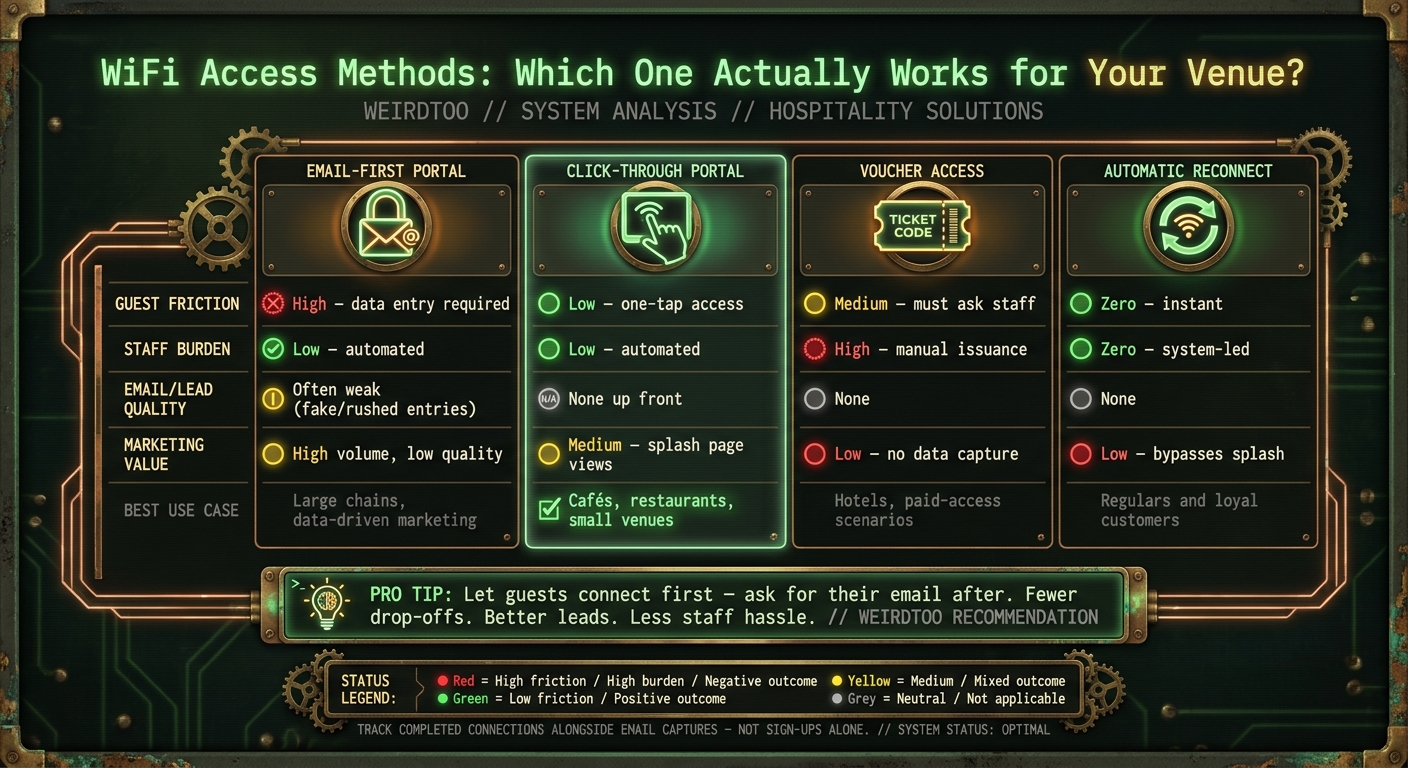
WiFi Access Methods Compared: Guest Friction, Staff Burden & Marketing Value
Get people online first. Ask later.
That is the fix.
When someone walks in, they are not in a “join our mailing list” mood. They want signal. Maybe they want your menu. Maybe they want to text someone that they got there. If you block that moment with a form, you create friction for no good reason.
Every option below beats an email wall at the door. The only real trade-off is how much friction you remove, and what you get back.
Instant access with a simple click-through page
A click-through portal is the lowest-friction option available. A guest joins the network, taps Accept on a splash page, and gets online right away. No account. No email. No form [1].
That splash page still earns its keep. It can show your menu, tonight’s specials, an event calendar, or a loyalty sign-up. So no, you are not “losing” the marketing moment. You are just not demanding an inbox before the person has even sat down [1].
That small shift matters more than people think.
Post-connection opt-ins that ask after the guest is already online
Once someone is connected, the mood changes. They are settled. They are not fighting the WiFi anymore. That is when the ask has a shot.
A specific offer, like a discount or event alert, tends to work better than a vague mailing-list gate [1]. The reason is simple: it feels optional, not forced.
And if they say yes then, you still get something useful. You now have a lead you can use for sales campaigns [1]. Not every guest will opt in. Fine. Better that than annoying everybody at the front door and losing half of them before they connect.
Minimal-data and one-time registration options
If you need data up front, keep it light. Less typing, fewer drop-offs.
A better setup is one-time registration tied to cookies or device IDs, so returning guests skip the splash page on the next visit [6]. For regulars, that means automatic reconnect. They do not have to think about it, which is kind of the point [3].
If email capture makes no sense for your setup, staff-issued voucher codes can work as a fallback. They do the job, but they add a manual step, which means staff has one more thing to deal with [2].
This is the part people get backwards: the best system is not the one that grabs the most data. It is the one that gets more guests connected with less hassle.
| Access Method | Guest Friction | Staff Burden | Marketing Value | Best Use Case |
|---|---|---|---|---|
| Email-First Portal | High (Data entry required) | Low (Automated) | High (Direct lead gen) | Large chains, data-driven marketing |
| Click-Through Portal | Low (One-tap access) | Low (Automated) | Medium (Splash page views) | Cafes, restaurants, small venues |
| Voucher Access | Medium (Must ask staff) | High (Manual issuance) | Low (No data capture) | Hotels, paid-access scenarios |
| Automatic Reconnect | Zero (Instant) | Zero (System-led) | Low (Bypasses splash page) | Regulars, loyal customers |
Conclusion: treat guest WiFi like part of the service, not a toll booth
Email-gated WiFi drops connections, annoys guests, and chips away at trust. The fix is not fancy. Ask for the sign-up after the guest is online, when it feels optional instead of like a little tax on internet access.
A branded splash page can do the job without getting in the way. Show the menu. Show the specials. Show the next event. Then ask for the opt-in after connection. No toll booth at the door. Just a simple access flow that works for the guest and still gives you a place to put your offer.
What to change first if your current WiFi sign-up is losing guests
If your current setup is still losing people, start with the boring part first. That is usually where the damage is.
Cut every field that does not need to be there. If WiFi asks for a name, email, and a pile of extra details, people will bail or type junk. You do not have a lead then. You have garbage in a spreadsheet.
Then test click-through access. Let guests tap Accept and get online right away. Move the email ask to a post-connection page, and tie it to something specific. Not “join our list.” That usually lands with all the charm of a parking ticket.
Watch two numbers side by side:
- Completed connections
- Email captures
If the capture rate looks fine but the connection rate is weak, you are making the door harder than it should be and ending up with a smaller list anyway.
Less friction at the door. More guests online. Better conversions.
FAQs
How much revenue can bad WiFi sign-up friction actually cost?
The annoying part first: there is no hard number here.
The sources available do not give a dollar figure for revenue lost when someone hits friction in a WiFi sign-up flow. No clean stat. No tidy "$X lost per month because your captive portal asks for too much stuff." If someone tells you they have that number from these sources, they are dressing up a guess.
What the sources do say is simpler than that. They talk about the upside of collecting lead info and the appeal of repeat income. Fine. That matters. But they do not tie that upside to abandonment rates inside captive-portal WiFi, and they do not show direct revenue loss from that friction.
So if you run a bar, café, or venue, here is the honest read:
- The source material supports the idea that lead capture can help.
- The source material supports the idea that repeat sales matter.
- The source material does not tell you how many people bail when the WiFi form gets annoying.
- It also does not tell you what that drop-off costs in dollars.
That gap matters. Otherwise you end up doing AI-theater math. You know the kind: made-up conversion rate, made-up average order value, made-up loss estimate, then everyone nods at the spreadsheet like it came down from a mountain.
If you want the revenue hit from WiFi friction, you would need your own numbers. Usually that means tracking starts, completions, and what those people do after they connect. Without that, the revenue claim is just a hunch in a blazer.
When should a venue ask for an email after access instead of before?
A venue should ask for an email after a guest connects to WiFi if the goal is lead info without the drop-off.
The reason is boring and brutal: if you block internet access behind a form, some people leave. They wanted WiFi, not homework. You turn a simple moment into friction, and friction kills response.
Yes, asking for an email can help with sales campaigns, product launches, or plain old awareness. But putting that ask before access tends to annoy guests and cut engagement. That trade-off is usually not worth it.
The better move is simple. Give them instant access or ask for the opt-in after they’re online. If you want an email, tie it to something extra: a membership area, special offers, early access, or another service that feels like a fair exchange.
That way, the guest gets what they came for first. Then you make the ask. Small change. Big difference.
What is the best low-friction WiFi setup for small venues?
The best low-friction setup for a small venue is a separate guest network. Keep guest traffic away from your POS, office gear, cameras, and anything else you’d rather not have poked by a stranger with 12% battery and too much time.
Skip the email-gated captive portal. For a small bar, café, or room with live events, instant access wins. People want to get online, not hand over an email address just to load Instagram. Most email gates feel like a toll booth nobody asked for, and plenty of people will bail before they finish.
If security is the sticking point, don’t fall back to one shared password taped behind the register. Use a managed guest network with basic logging and firewall rules. That gives you a cleaner setup: guests get online fast, and your internal systems stay fenced off where they belong.
Current contact path
Need custom apparel or scoped help?
Use the contact form; removed product, checkout, research, and newsletter funnels stay offline.