Loading…
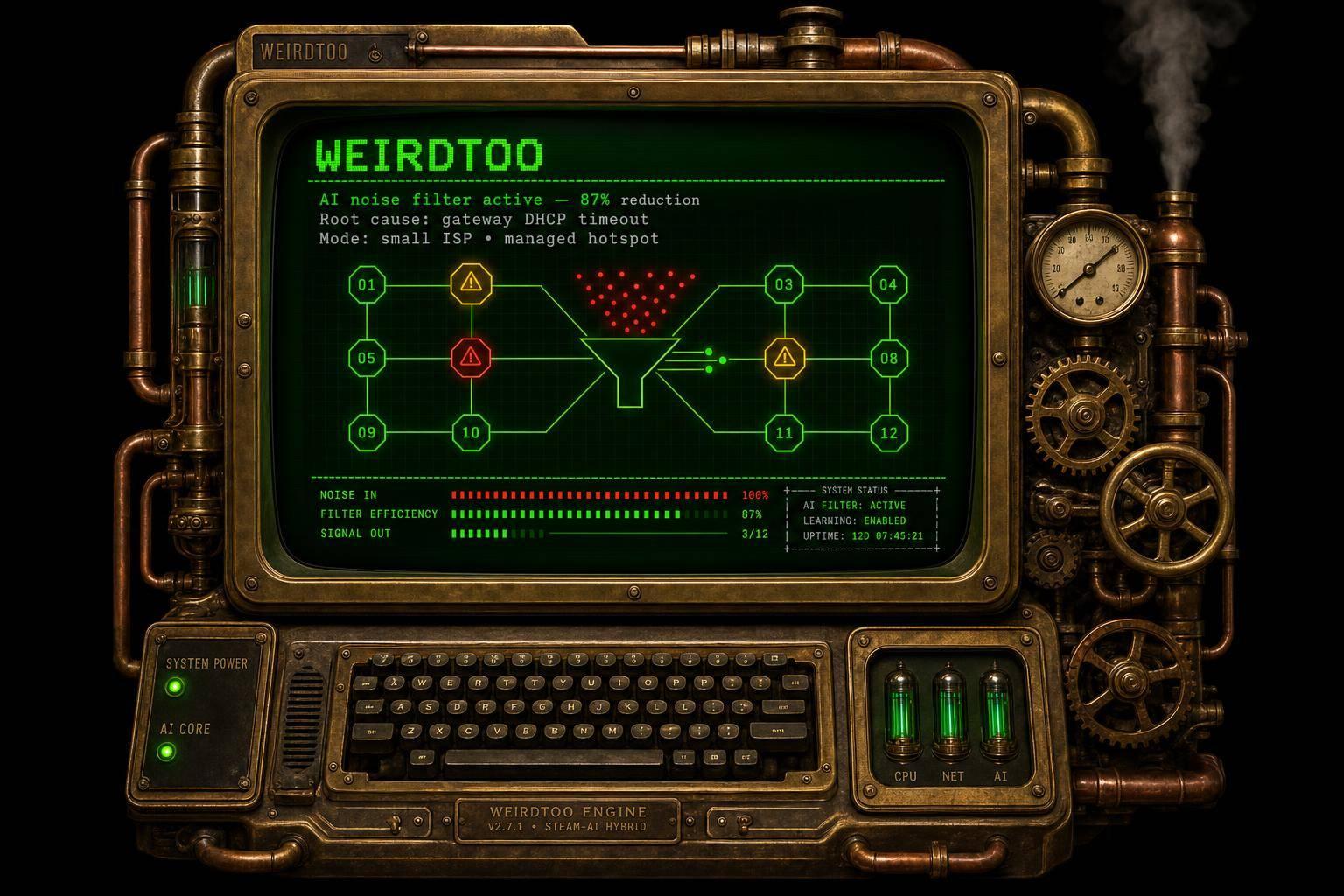
How AI Enhances Network Troubleshooting Solutions
By weirdtoo·June 29, 2026·12 min read
AI reduces alert noise, speeds detection and root-cause analysis for small ISPs and managed hotspots—while keeping humans in control.
How AI Enhances Network Troubleshooting Solutions
AI helps network teams find problems sooner, cut alert noise, and fix issues with less guesswork. In the article, I see three big takeaways: AI spots odd behavior before users pile into support, it links logs and topology data to find the cause faster, and it helps small teams avoid extra truck rolls.
Here’s the short version:
- Manual troubleshooting is slow because alerts, logs, and device data sit in different tools.
- AI-assisted troubleshooting cuts MTTR by tying those signals into one incident view. One example in the article shows a 50% drop in MTTR.[1]
- Small and rural providers gain the most because they often have fewer techs, longer drive times, and less room for error.
- AI is best used first for detection and triage, not full auto-fix.
- Clean telemetry and human approval gates still matter before any network change is made.
A few numbers stand out:
- 83% less time to identify problems at C Spire [1]
- 80% less detection time [1]
- 55% fewer escalations in one MSP example [2]
- $250,000/year saved by avoiding two senior hires [2]
My read: AI does not replace the tech. It gives the tech a faster starting point, a shorter path to root cause, and fewer wasted site visits.
| Area | Manual approach | AI-assisted approach |
|---|---|---|
| Detection | Often starts after users complain | Finds odd patterns earlier |
| Triage | Many separate alerts | Groups related alerts into one case |
| Root cause | Manual log digging | Links logs, config, traffic, and topology |
| Remote support | Often weak | Better off-site diagnosis |
| Risk | Human delay | Needs clean data and review gates |
If you run a local ISP, rural Wi-Fi network, or managed hotspot service, the article’s main point is simple: use AI to cut noise, speed diagnosis, and support junior staff, but keep people in control of network changes.
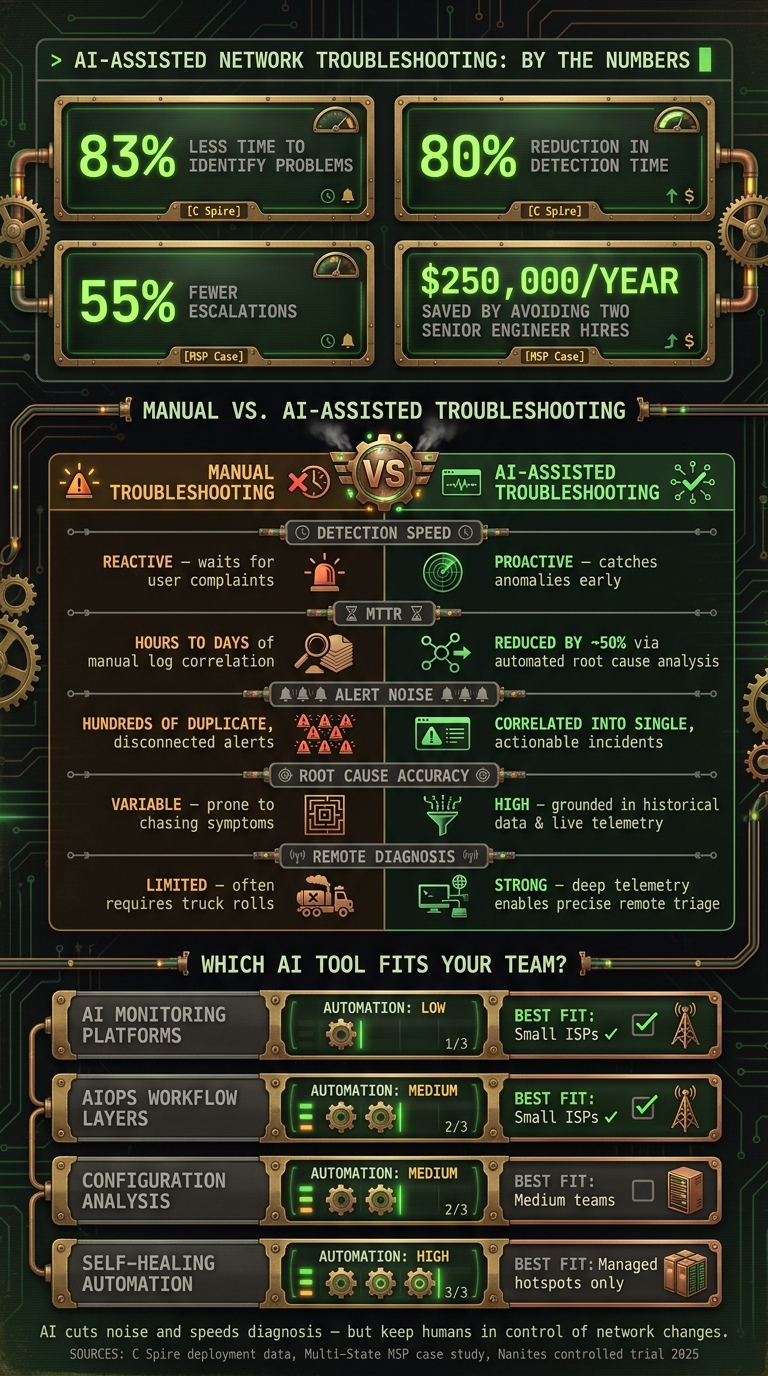
AI vs. Manual Network Troubleshooting: Key Stats & Outcomes
Automated Network Troubleshooting using Splunk, AI and Ansible EDA | Ep. 80
sbb-itb-342b8b2
The problem: Why manual and legacy troubleshooting break down
Manual troubleshooting starts after users feel the pain. By the time a technician sees an alert and begins digging, downtime is already in motion. The process is backward: teams react to impact, then scramble to piece together context from different devices. And manual triage often ends with a wire-level deep dive only after precious time is gone.
The issue usually isn't missing data. It's missing context.
Reactive workflows increase downtime and truck rolls
When teams don't have that context, costs climb fast. A truck roll can burn hours of labor before anyone even confirms what's wrong. And that's the bigger failure here: logs and devices aren't sharing one clear story. Without that shared view, slower diagnosis, extra truck rolls, and wasted time from senior engineers become the default.
Too many alerts, logs, and disconnected systems
NetFlow, Syslog, and SNMP data often live in separate tools. So when one network incident hits, teams can end up staring at hundreds of alerts spread across multiple monitoring systems.[7] Most of those alerts are duplicates or plain noise, which means the signal that matters gets buried.
That's alert overload. And it's one reason skilled technicians miss early warning signs.
About 75% of organizations are still tied up with routine incident handling because of data overload and tool sprawl.[6]
For small teams without a dedicated NOC, the problem gets worse. Tier-1 helpdesk staff often don't have enough context to sort out vague complaints like "network slowness" across multi-vendor hardware, so they escalate. One multi-state MSP managing 2,500 endpoints across 200+ locations found that its help desk had turned into a ticket-routing function, pushing 55% of tickets to costly Tier-3 engineers. Those engineers then spent hours hunting for root causes.[2]
"Before NetOp, our help desk was essentially a routing service for tickets. Now, they are a resolution service. The AI provides the 'brain' that our junior techs haven't developed through years of experience yet." - Director of Technical Services, Multi-State Infrastructure MSP [2]
This is where AI starts to help. It pulls scattered signals into one incident view.
Comparison table: Manual vs. AI-assisted troubleshooting
| Feature | Manual Troubleshooting | AI-Assisted Troubleshooting |
|---|---|---|
| Detection Speed | Reactive - waits for user complaints or threshold alerts | Proactive - catches anomalies before users are impacted |
| Mean Time to Repair (MTTR) | Hours to days of manual log correlation | Reduced by ~50% through automated root cause analysis [1] |
| Alert Noise | Hundreds of duplicate, disconnected alerts [7] | Correlated into single, actionable incidents |
| Root Cause Accuracy | Variable - prone to chasing symptoms [4] | High - grounded in historical data and live telemetry |
| Remote Diagnosis | Limited - often requires on-site truck rolls | Strong - deep telemetry enables precise remote triage |
These are the exact gaps AI-assisted diagnostics is meant to fix.
The solution: Core AI capabilities that improve diagnostics
AI helps close the gap between an alert and a diagnosis. For community ISPs, rural Wi-Fi providers, and hotspot operators, that often means fewer truck rolls and faster remote triage. When a small team has to sort out problems from a distance and move fast, that can make a big difference.
Anomaly detection catches issues before users flood support
Old-school monitoring usually waits for a metric to cross a fixed limit. CPU hits 90%, an alert goes off, and by that point users may already feel the impact.
AI works differently. It learns what “normal” looks like across your network, then flags behavior that starts to drift before it turns into a full outage.
That matters for issues like slow fiber drift, rising authentication failures, or backhaul congestion. These problems may not trip a static alert, but they can still point to trouble ahead. AI spots the pattern early, while static thresholds can miss it. It can also group related events into a single incident, so the team works one case instead of bouncing between separate alarms.
Once the system spots the pattern, the next job is figuring out what caused it.
Root cause analysis and alert correlation cut guesswork
Finding an anomaly is only the first step. The harder part is knowing why it happened. That’s where manual troubleshooting often breaks down.
AI agents do more than point at symptoms. They connect logs, topology, traffic, and config changes to narrow down the cause. That’s a big deal when one incident touches access points, switches, backhaul, and CPE at the same time.
In November 2025, Nanites ran a controlled trial that simulated an interface outage across a Cisco IS-IS network. The AI agent reviewed the alert, worked through the network topology, and found the root cause in 3 minutes. The same task usually takes a skilled engineer more than 30 minutes. [6]
This also gives junior techs context they might not have on their own. If a technician gets a vague complaint about network slowness, the AI can add the missing detail: which port is involved, which device is affected, what changed recently, and what fix is most likely to work. Instead of escalating on instinct, the technician gets a direct recommendation.
"It allows us to move telecom operators past the manual troubleshooting, and by embedding these agents into our software, networks can automatically triage the issues and probably fix those issues very, very rapidly." - Vivek Jaiswal, SVP of Autonomous Networks, Nokia [5]
From there, the focus shifts from diagnosis to response.
Predictive maintenance and controlled automation cut response time
AI can also shorten response time by spotting likely failures early and handling safe first actions. By watching degradation trends, it can flag trouble before service breaks.
That might include:
- A link slowly losing packet rates over several days
- A PoE budget inching toward its ceiling
- SFP or fiber signal health starting to slip
For small operators, that means scheduling maintenance before customers start calling.
When action has to happen fast, controlled automation can take the first safe step, like rerouting traffic or restarting devices. More risky moves, such as configuration rollbacks, should stay behind human approval. Tata Communications' IZO DC Dynamic Connectivity platform, launched in March 2025, uses deterministic multipath routing to automatically reroute traffic within seconds of a cable cut or route failure. [3]
That human gate matters. If an action could affect more of the network, the AI should present a recommendation and explain why, then wait for approval before doing anything. As John Burke, CTO of Nemertes Research, put it:
"Agentic AI can show some level of environmental awareness, such as knowing not to restart a switch as part of routine maintenance during business hours." - John Burke, CTO, Nemertes Research [3]
That’s the point where AI starts moving from diagnosis support into operations support.
Where AI helps most in rural WiFi, community ISP, and hotspot operations
These capabilities matter most in the field, where one bad diagnosis can lead to a truck roll you never needed in the first place. AI helps local teams figure out whether the fault sits on the client device, access point, backhaul, or upstream link. In rural operations, that call matters a lot: there are fewer technicians, longer drives, and less visibility once someone is off-site. One wrong guess costs labor and can send a tech down the road for nothing.
Faster triage across guest Wi-Fi, fixed wireless, fiber, and local access networks
AI cuts through client-side noise by correlating authentication data, telemetry, and traffic patterns. That makes it easier to prove whether the issue is yours to fix. And that one answer alone can save a wasted service call.
You can see that in the field. In April 2026, C Spire, a Mississippi-based telecommunications provider, deployed an AI assistant to correlate noisy alarm logs across its network. The result: an 83% drop in time to identify the problem, an 80% drop in detection time, and a 50% drop in Mean Time to Resolution (MTTR).[1]
"Our goal is to keep our network resilient by proactively stopping issues before they start and delivering the connectivity that our customers depend on." - C Spire [1]
Example: AI-supported managed hotspot workflows in practice
In a managed hotspot setup, AI can flag anomalies and surface a likely cause with the right context. People still review the recommendation before anything changes on the network. That guardrail matters.
A multi-state infrastructure MSP managing more than 2,500 endpoints across 200+ client locations deployed NetOp AI. Its Tier-1 help desk resolved 70% of network anomalies autonomously, including a BGP flapping event traced to a failing ISP gateway 20 miles away. Escalations fell by 55%, and the team avoided two senior engineer hires, saving an estimated $250,000 in annual payroll.[2]
Comparison table: AI troubleshooting tool categories
The right tool depends on how much autonomy a team can safely allow. For small community ISPs and local operators, the best fit comes down to team size, network complexity, and how much automated action is safe in day-to-day operations.
| Tool Category | Primary Purpose | Data Inputs | Automation Level | Fit for Small ISPs / Local Teams |
|---|---|---|---|---|
| AI Monitoring Platforms | Anomaly detection and real-time observability | Telemetry, logs, SNMP, flow data | Low - alerting focus | High; catches issues early before users call |
| AIOps Workflow Layers | Alert correlation and ticket triage | ITSM tickets, historical logs, alerts | Medium - assists triage | High; cuts noise and helps small teams avoid escalation traps |
| Configuration Analysis | Detecting misconfigs (MTU, VLAN, BGP) | Device configs, CLI state, routing tables | Medium - diagnostic focus | Medium; needs expert review before action |
| Self-Healing Automation | Autonomous remediation and traffic rerouting | Real-time traffic state, topology | High - automatic remediation | Low; best for managed hotspots with clear business rules |
For small teams, it makes sense to start with monitoring and alert correlation. Self-healing fits better in tightly controlled cases, where telemetry, baselines, and approval rules are already in place.
Implementation safeguards and conclusion
What must be in place before AI can help
AI troubleshooting tools are only as good as the data they get. That means a team needs clean telemetry: logs, device metrics, accurate inventory, and verified topology before anything else.
If that data is off, the AI starts from the wrong picture. And once automation acts on bad data, small mistakes can turn into bigger outages. Put simply: AI needs verified ground truth before it can do useful work.
A few problems tend to get in the way. Some teams still rely on legacy hardware that doesn't expose structured telemetry. Others have logs spread across different systems with no central collection. And in some cases, staff don't have a clear baseline for what normal looks like [4][2].
There’s also a security issue that can’t be brushed aside. Sensitive data such as IP addresses, BGP neighbor IPs, SNMP strings, and credentials must be sanitized before any configuration is sent to a cloud-based AI tool [8].
How to roll out AI safely in small teams
Once the data is clean, the safest move is to keep the rollout tight and easy to review. Use AI only after telemetry, runbooks, and approval gates are in place [6][2]. And don't automate remediation until runbooks and approval rules match across all sites [6].
This is where small teams can get into trouble if they move too fast. It’s tempting to let the system start fixing things on its own. But if one site follows one playbook and another site follows a different one, that’s asking for a mess.
Even in low-risk pilots, every action needs traceability. Each AI action should leave an audit trail that shows the commands run and the reason behind each action [7]. And for any customer-facing or high-risk configuration change, a human review gate is non-negotiable [5][6].
Conclusion: Faster diagnosis, less noise, better network operations
The main point is simple. Legacy troubleshooting is reactive and leans heavily on a small number of senior engineers. AI helps teams spot problems faster, cut alert fatigue, and handle issues that once had to be escalated. Rural and local operators stand to gain the most because they often need faster remote diagnosis and better visibility across sites.
Still, those gains hold up only when the workflow is structured and easy to review. As Renata Silva, Head of Nokia's Autonomous Networks Business, said: "The agents are giving extra explainability and trust that was not there before. It's not a black box." [5]
That kind of transparency is what separates useful AI from risky automation. AI can cut noise and speed diagnosis, but the final action should stay under human control.
FAQs
How does AI find network issues earlier?
AI can spot network problems early by watching the network 24/7 for odd behavior and patterns that may point to failures before they turn into outages. It keeps checking telemetry, logs, and configuration data to bring early warning signs to the surface.
Instead of treating every alert like a separate fire drill, AI groups related events together. That cuts noise and helps teams diagnose issues before they spread. Some tools also check network paths against current conditions to flag reachability risks or policy violations early.
What data does AI need to troubleshoot well?
To troubleshoot well, AI needs network data from many sources plus context from the domain itself. That includes device configurations, system messages, syslog outputs, and performance metrics like NetFlow, SNMP traps, and DNS/DHCP logs.
It also uses topology maps, traffic patterns, and past ITSM incident data to spot anomalies, trace dependencies, and predict root causes. At WEIRDTOO Company, that means using structured, high-quality data so network diagnostics are more dependable.
When should humans approve AI actions?
Humans should approve AI actions when network changes or fixes need final sign-off to protect stability, especially in places where full autonomy isn’t trusted or isn’t the right fit.
AI can do the heavy diagnostic work. But human oversight is still the standard safeguard. In most systems, the AI presents its analysis and suggested next steps, and an engineer reviews them before any disruptive changes go live.
Current contact path
Need Weird Network WiFi, custom apparel, or scoped help?
Use the contact form; removed product, checkout, research, and newsletter funnels stay offline.